
Diffusers documentation
Marigold Computer Vision
Marigold Computer Vision
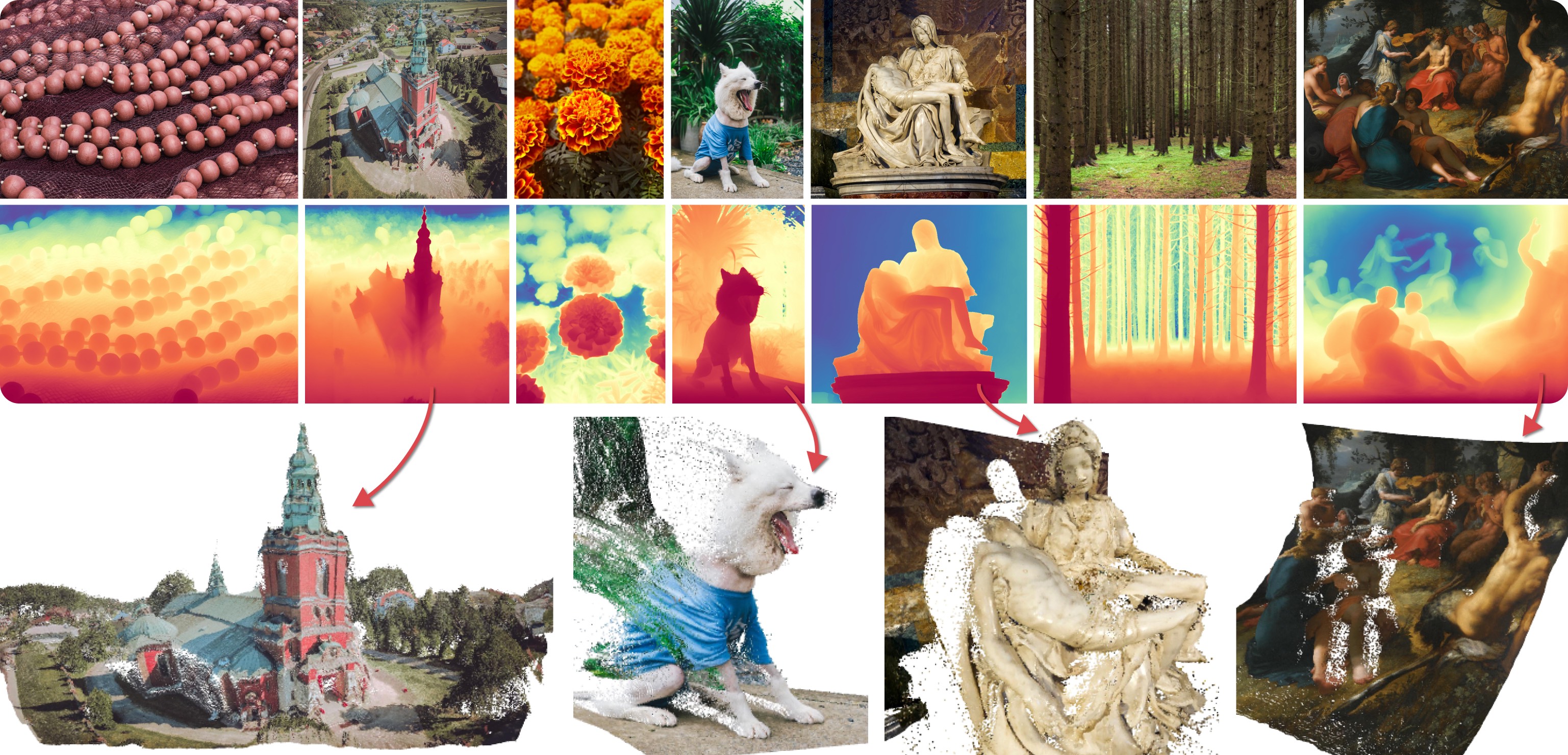
Marigold was proposed in Repurposing Diffusion-Based Image Generators for Monocular Depth Estimation, a CVPR 2024 Oral paper by Bingxin Ke, Anton Obukhov, Shengyu Huang, Nando Metzger, Rodrigo Caye Daudt, and Konrad Schindler. The core idea is to repurpose the generative prior of Text-to-Image Latent Diffusion Models (LDMs) for traditional computer vision tasks. This approach was explored by fine-tuning Stable Diffusion for Monocular Depth Estimation, as demonstrated in the teaser above.
Marigold was later extended in the follow-up paper, Marigold: Affordable Adaptation of Diffusion-Based Image Generators for Image Analysis, authored by Bingxin Ke, Kevin Qu, Tianfu Wang, Nando Metzger, Shengyu Huang, Bo Li, Anton Obukhov, and Konrad Schindler. This work expanded Marigold to support new modalities such as Surface Normals and Intrinsic Image Decomposition (IID), introduced a training protocol for Latent Consistency Models (LCM), and demonstrated High-Resolution (HR) processing capability.
The early Marigold models (
v1-0and earlier) were optimized for best results with at least 10 inference steps. LCM models were later developed to enable high-quality inference in just 1 to 4 steps. Marigold modelsv1-1and later use the DDIM scheduler to achieve optimal results in as few as 1 to 4 steps.
Available Pipelines
Each pipeline is tailored for a specific computer vision task, processing an input RGB image and generating a corresponding prediction. Currently, the following computer vision tasks are implemented:
| Pipeline | Recommended Model Checkpoints | Spaces (Interactive Apps) | Predicted Modalities |
|---|---|---|---|
| MarigoldDepthPipeline | prs-eth/marigold-depth-v1-1 | Depth Estimation | Depth, Disparity |
| MarigoldNormalsPipeline | prs-eth/marigold-normals-v1-1 | Surface Normals Estimation | Surface normals |
| MarigoldIntrinsicsPipeline | prs-eth/marigold-iid-appearance-v1-1, prs-eth/marigold-iid-lighting-v1-1 | Intrinsic Image Decomposition | Albedo, Materials, Lighting |
Available Checkpoints
All original checkpoints are available under the PRS-ETH organization on Hugging Face. They are designed for use with diffusers pipelines and the original codebase, which can also be used to train new model checkpoints. The following is a summary of the recommended checkpoints, all of which produce reliable results with 1 to 4 steps.
| Checkpoint | Modality | Comment |
|---|---|---|
| prs-eth/marigold-depth-v1-1 | Depth | Affine-invariant depth prediction assigns each pixel a value between 0 (near plane) and 1 (far plane), with both planes determined by the model during inference. |
| prs-eth/marigold-normals-v0-1 | Normals | The surface normals predictions are unit-length 3D vectors in the screen space camera, with values in the range from -1 to 1. |
| prs-eth/marigold-iid-appearance-v1-1 | Intrinsics | InteriorVerse decomposition is comprised of Albedo and two BRDF material properties: Roughness and Metallicity. |
| prs-eth/marigold-iid-lighting-v1-1 | Intrinsics | HyperSim decomposition of an image is comprised of Albedo $A$, Diffuse shading $S$, and Non-diffuse residual $R$: $I = A*S+R$. |
Make sure to check out the Schedulers guide to learn how to explore the tradeoff between scheduler speed and quality, and see the reuse components across pipelines section to learn how to efficiently load the same components into multiple pipelines. Also, to know more about reducing the memory usage of this pipeline, refer to the [“Reduce memory usage”] section here.
Marigold pipelines were designed and tested with the scheduler embedded in the model checkpoint. The optimal number of inference steps varies by scheduler, with no universal value that works best across all cases. To accommodate this, the
num_inference_stepsparameter in the pipeline’s__call__method defaults toNone(see the API reference). Unless set explicitly, it inherits the value from thedefault_denoising_stepsfield in the checkpoint configuration file (model_index.json). This ensures high-quality predictions when invoking the pipeline with only theimageargument.
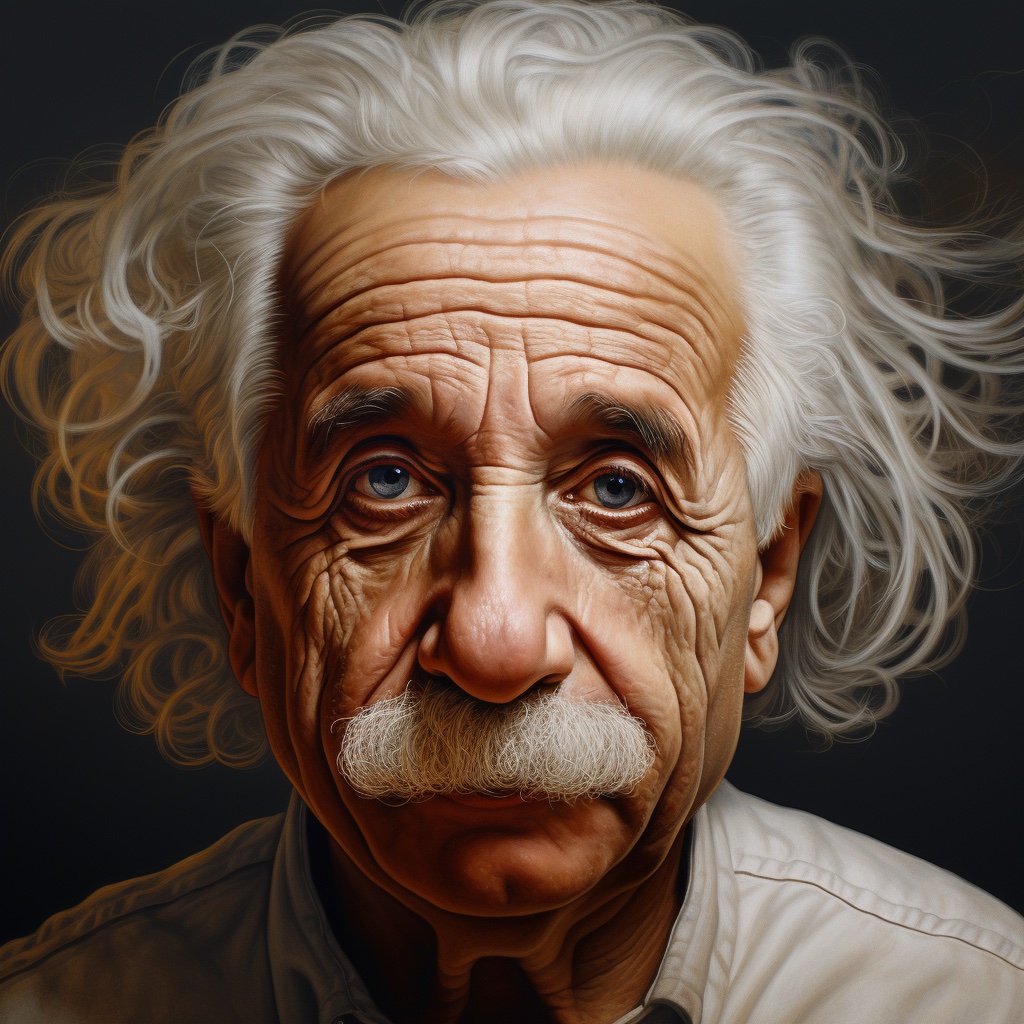
The examples below are mostly given for depth prediction, but they can be universally applied to other supported modalities. We showcase the predictions using the same input image of Albert Einstein generated by Midjourney. This makes it easier to compare visualizations of the predictions across various modalities and checkpoints.
Depth Prediction
To get a depth prediction, load the prs-eth/marigold-depth-v1-1 checkpoint into MarigoldDepthPipeline,
put the image through the pipeline, and save the predictions:
import diffusers
import torch

pipe = diffusers.MarigoldDepthPipeline.from_pretrained(
    "prs-eth/marigold-depth-v1-1", variant="fp16", torch_dtype=torch.float16
).to("cuda")

image = diffusers.utils.load_image("https://marigoldmonodepth.github.io/images/einstein.jpg")

depth = pipe(image)

vis = pipe.image_processor.visualize_depth(depth.prediction)
vis[0].save("einstein_depth.png")

depth_16bit = pipe.image_processor.export_depth_to_16bit_png(depth.prediction)
depth_16bit[0].save("einstein_depth_16bit.png")
The visualize_depth() function applies one of
matplotlib’s colormaps (Spectral by default) to map the predicted pixel values from a single-channel [0, 1]
depth range into an RGB image.
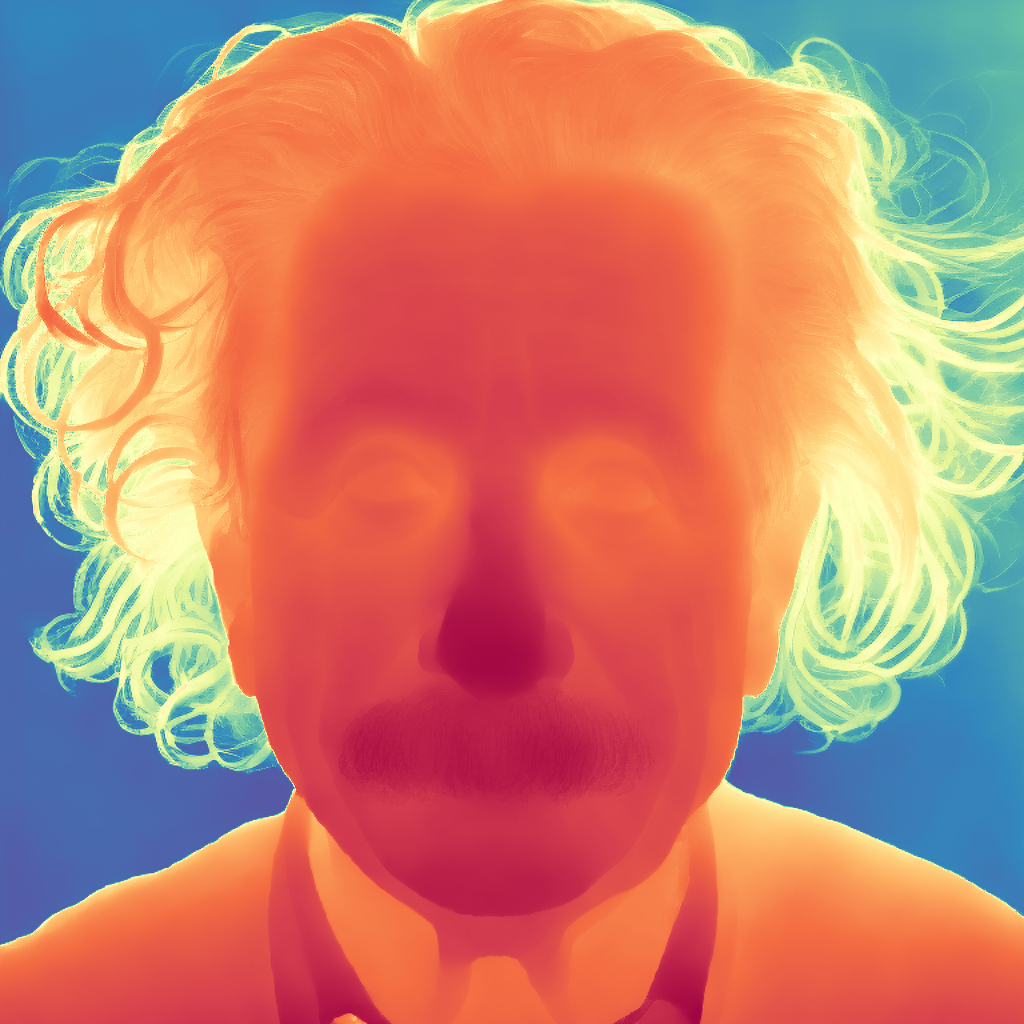
With the Spectral colormap, pixels with near depth are painted red, and far pixels are blue.
The 16-bit PNG file stores the single channel values mapped linearly from the [0, 1] range into [0, 65535].
Below are the raw and the visualized predictions. The darker and closer areas (mustache) are easier to distinguish in
the visualization.

Surface Normals Estimation
Load the prs-eth/marigold-normals-v1-1 checkpoint into MarigoldNormalsPipeline, put the image through the
pipeline, and save the predictions:
import diffusers
import torch

pipe = diffusers.MarigoldNormalsPipeline.from_pretrained(
    "prs-eth/marigold-normals-v1-1", variant="fp16", torch_dtype=torch.float16
).to("cuda")

image = diffusers.utils.load_image("https://marigoldmonodepth.github.io/images/einstein.jpg")

normals = pipe(image)

vis = pipe.image_processor.visualize_normals(normals.prediction)
vis[0].save("einstein_normals.png")
The visualize_normals() maps the three-dimensional
prediction with pixel values in the range [-1, 1] into an RGB image.
The visualization function supports flipping surface normals axes to make the visualization compatible with other
choices of the frame of reference.
Conceptually, each pixel is painted according to the surface normal vector in the frame of reference, where X axis
points right, Y axis points up, and Z axis points at the viewer.
Below is the visualized prediction:

In this example, the nose tip almost certainly has a point on the surface, in which the surface normal vector points
straight at the viewer, meaning that its coordinates are [0, 0, 1].
This vector maps to the RGB [128, 128, 255], which corresponds to the violet-blue color.
Similarly, a surface normal on the cheek in the right part of the image has a large X component, which increases the
red hue.
Points on the shoulders pointing up with a large Y promote green color.
Intrinsic Image Decomposition
Marigold provides two models for Intrinsic Image Decomposition (IID): “Appearance” and “Lighting”. Each model produces Albedo maps, derived from InteriorVerse and Hypersim annotations, respectively.
- The “Appearance” model also estimates Material properties: Roughness and Metallicity.
- The “Lighting” model generates Diffuse Shading and Non-diffuse Residual.
Here is the sample code saving predictions made by the “Appearance” model:
import diffusers
import torch

pipe = diffusers.MarigoldIntrinsicsPipeline.from_pretrained(
    "prs-eth/marigold-iid-appearance-v1-1", variant="fp16", torch_dtype=torch.float16
).to("cuda")

image = diffusers.utils.load_image("https://marigoldmonodepth.github.io/images/einstein.jpg")

intrinsics = pipe(image)

vis = pipe.image_processor.visualize_intrinsics(intrinsics.prediction, pipe.target_properties)
vis[0]["albedo"].save("einstein_albedo.png")
vis[0]["roughness"].save("einstein_roughness.png")
vis[0]["metallicity"].save("einstein_metallicity.png")
Another example demonstrating the predictions made by the “Lighting” model:
import diffusers
import torch

pipe = diffusers.MarigoldIntrinsicsPipeline.from_pretrained(
    "prs-eth/marigold-iid-lighting-v1-1", variant="fp16", torch_dtype=torch.float16
).to("cuda")

image = diffusers.utils.load_image("https://marigoldmonodepth.github.io/images/einstein.jpg")

intrinsics = pipe(image)

vis = pipe.image_processor.visualize_intrinsics(intrinsics.prediction, pipe.target_properties)
vis[0]["albedo"].save("einstein_albedo.png")
vis[0]["shading"].save("einstein_shading.png")
vis[0]["residual"].save("einstein_residual.png")
Both models share the same pipeline while supporting different decomposition types.
The exact decomposition parameterization (e.g., sRGB vs. linear space) is stored in the
pipe.target_properties dictionary, which is passed into the
visualize_intrinsics() function.
Below are some examples showcasing the predicted decomposition outputs. All modalities can be inspected in the Intrinsic Image Decomposition Space.


Speeding up inference
The above quick start snippets are already optimized for quality and speed, loading the checkpoint, utilizing the
fp16 variant of weights and computation, and performing the default number (4) of denoising diffusion steps.
The first step to accelerate inference, at the expense of prediction quality, is to reduce the denoising diffusion
steps to the minimum:
  import diffusers
  import torch

  pipe = diffusers.MarigoldDepthPipeline.from_pretrained(
      "prs-eth/marigold-depth-v1-1", variant="fp16", torch_dtype=torch.float16
  ).to("cuda")

  image = diffusers.utils.load_image("https://marigoldmonodepth.github.io/images/einstein.jpg")

- depth = pipe(image)
+ depth = pipe(image, num_inference_steps=1)
With this change, the pipe call completes in 280ms on RTX 3090 GPU.
Internally, the input image is first encoded using the Stable Diffusion VAE encoder, followed by a single denoising
step performed by the U-Net.
Finally, the prediction latent is decoded with the VAE decoder into pixel space.
In this setup, two out of three module calls are dedicated to converting between the pixel and latent spaces of the LDM.
Since Marigold’s latent space is compatible with Stable Diffusion 2.0, inference can be accelerated by more than 3x,
reducing the call time to 85ms on an RTX 3090, by using a lightweight replacement of the SD VAE.
Note that using a lightweight VAE may slightly reduce the visual quality of the predictions.
  import diffusers
  import torch

  pipe = diffusers.MarigoldDepthPipeline.from_pretrained(
      "prs-eth/marigold-depth-v1-1", variant="fp16", torch_dtype=torch.float16
  ).to("cuda")

+ pipe.vae = diffusers.AutoencoderTiny.from_pretrained(
+     "madebyollin/taesd", torch_dtype=torch.float16
+ ).cuda()

  image = diffusers.utils.load_image("https://marigoldmonodepth.github.io/images/einstein.jpg")

  depth = pipe(image, num_inference_steps=1)
So far, we have optimized the number of diffusion steps and model components. Self-attention operations account for a significant portion of computations. Speeding them up can be achieved by using a more efficient attention processor:
  import diffusers
  import torch
+ from diffusers.models.attention_processor import AttnProcessor2_0

  pipe = diffusers.MarigoldDepthPipeline.from_pretrained(
      "prs-eth/marigold-depth-v1-1", variant="fp16", torch_dtype=torch.float16
  ).to("cuda")

+ pipe.vae.set_attn_processor(AttnProcessor2_0())
+ pipe.unet.set_attn_processor(AttnProcessor2_0())

  image = diffusers.utils.load_image("https://marigoldmonodepth.github.io/images/einstein.jpg")

  depth = pipe(image, num_inference_steps=1)
Finally, as suggested in Optimizations, enabling torch.compile can further enhance performance depending on
the target hardware.
However, compilation incurs a significant overhead during the first pipeline invocation, making it beneficial only when
the same pipeline instance is called repeatedly, such as within a loop.
  import diffusers
  import torch
  from diffusers.models.attention_processor import AttnProcessor2_0

  pipe = diffusers.MarigoldDepthPipeline.from_pretrained(
      "prs-eth/marigold-depth-v1-1", variant="fp16", torch_dtype=torch.float16
  ).to("cuda")

  pipe.vae.set_attn_processor(AttnProcessor2_0())
  pipe.unet.set_attn_processor(AttnProcessor2_0())

+ pipe.vae = torch.compile(pipe.vae, mode="reduce-overhead", fullgraph=True)
+ pipe.unet = torch.compile(pipe.unet, mode="reduce-overhead", fullgraph=True)

  image = diffusers.utils.load_image("https://marigoldmonodepth.github.io/images/einstein.jpg")

  depth = pipe(image, num_inference_steps=1)
Maximizing Precision and Ensembling
Marigold pipelines have a built-in ensembling mechanism combining multiple predictions from different random latents.
This is a brute-force way of improving the precision of predictions, capitalizing on the generative nature of diffusion.
The ensembling path is activated automatically when the ensemble_size argument is set greater or equal than 3.
When aiming for maximum precision, it makes sense to adjust num_inference_steps simultaneously with ensemble_size.
The recommended values vary across checkpoints but primarily depend on the scheduler type.
The effect of ensembling is particularly well-seen with surface normals:
  import diffusers

  pipe = diffusers.MarigoldNormalsPipeline.from_pretrained("prs-eth/marigold-normals-v1-1").to("cuda")

  image = diffusers.utils.load_image("https://marigoldmonodepth.github.io/images/einstein.jpg")

- depth = pipe(image)
+ depth = pipe(image, num_inference_steps=10, ensemble_size=5)

  vis = pipe.image_processor.visualize_normals(depth.prediction)
vis[0].save("einstein_normals.png") 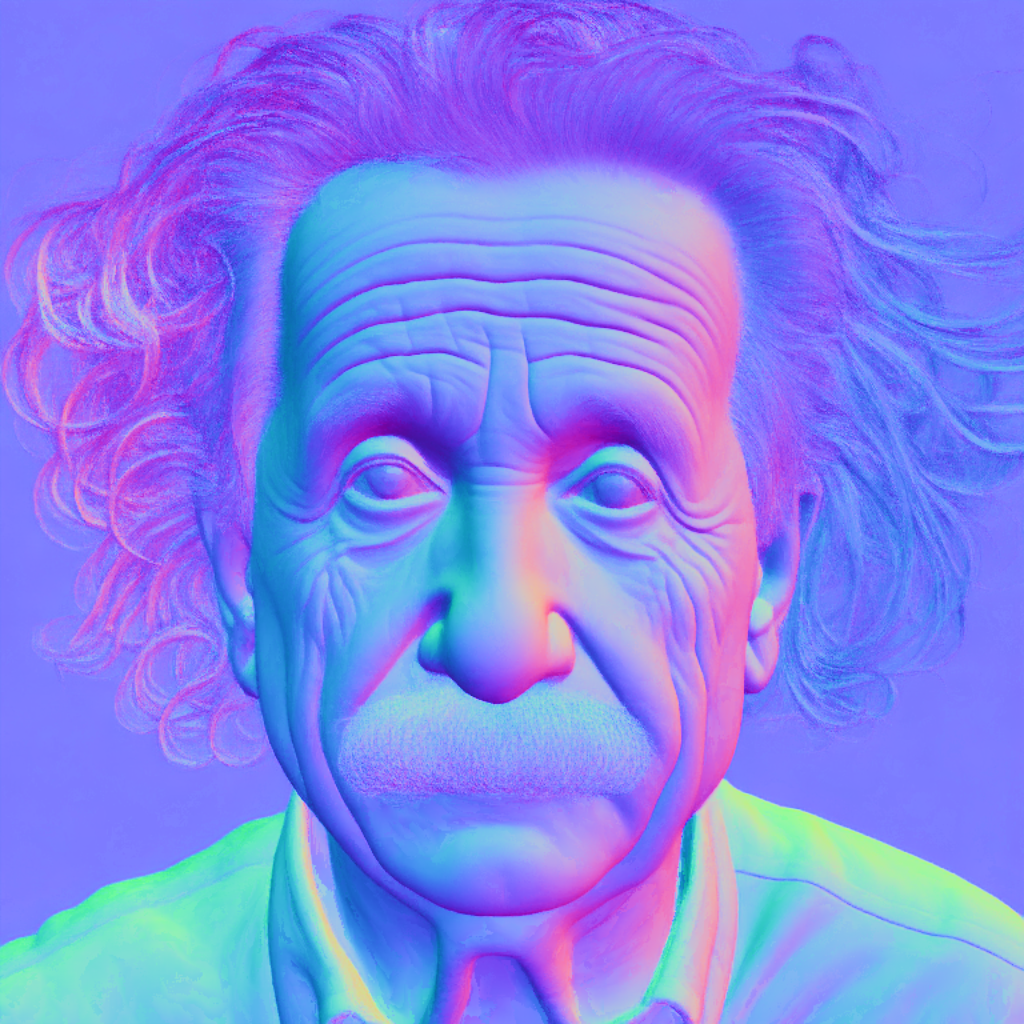
As can be seen, all areas with fine-grained structurers, such as hair, got more conservative and on average more correct predictions. Such a result is more suitable for precision-sensitive downstream tasks, such as 3D reconstruction.
Frame-by-frame Video Processing with Temporal Consistency
Due to Marigold’s generative nature, each prediction is unique and defined by the random noise sampled for the latent initialization. This becomes an obvious drawback compared to traditional end-to-end dense regression networks, as exemplified in the following videos:

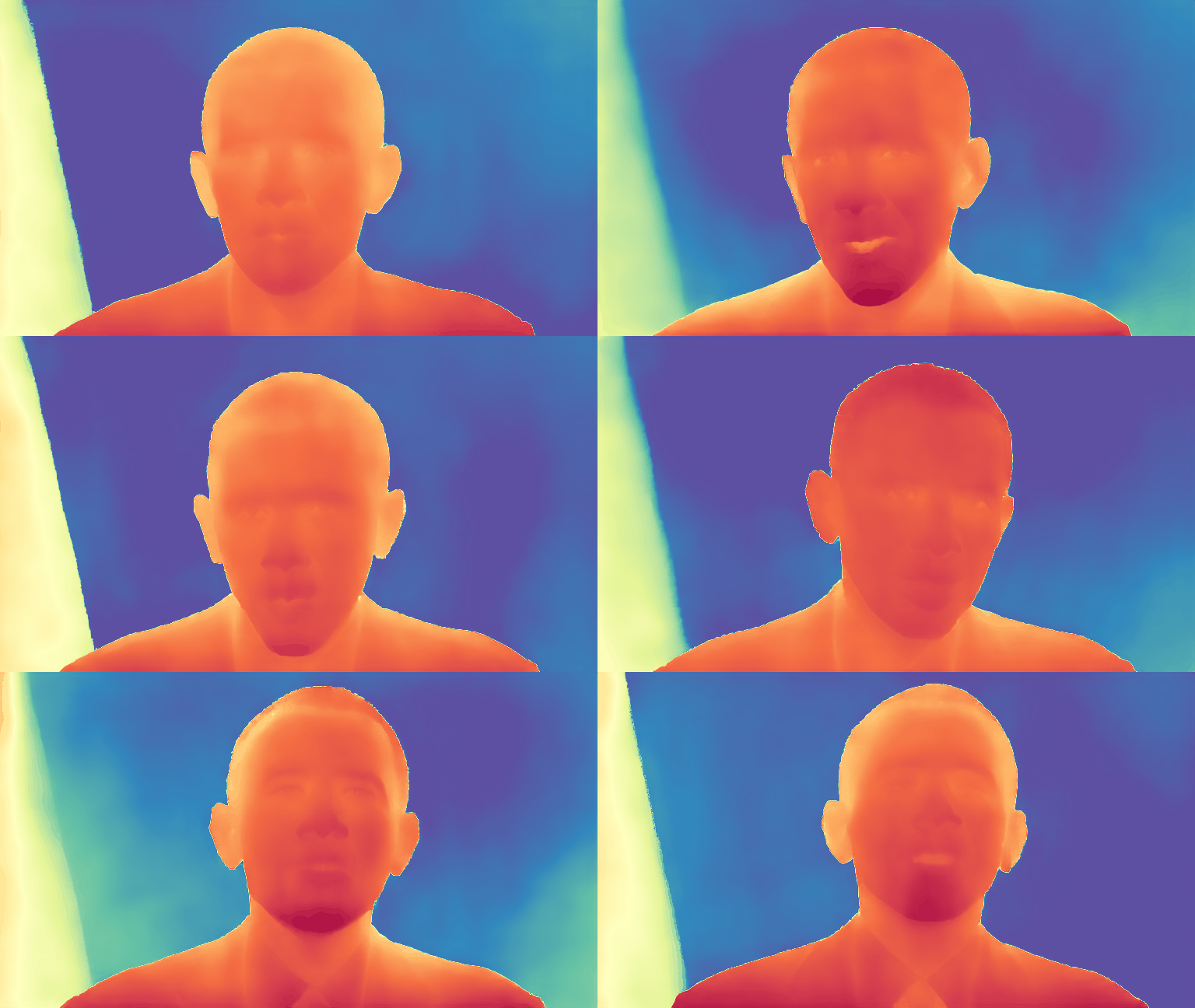
To address this issue, it is possible to pass latents argument to the pipelines, which defines the starting point of
diffusion.
Empirically, we found that a convex combination of the very same starting point noise latent and the latent
corresponding to the previous frame prediction give sufficiently smooth results, as implemented in the snippet below:
import imageio
import diffusers
import torch
from diffusers.models.attention_processor import AttnProcessor2_0
from PIL import Image
from tqdm import tqdm

device = "cuda"
path_in = "https://huggingface.co/spaces/prs-eth/marigold-lcm/resolve/c7adb5427947d2680944f898cd91d386bf0d4924/files/video/obama.mp4"
path_out = "obama_depth.gif"

pipe = diffusers.MarigoldDepthPipeline.from_pretrained(
    "prs-eth/marigold-depth-v1-1", variant="fp16", torch_dtype=torch.float16
).to(device)
pipe.vae = diffusers.AutoencoderTiny.from_pretrained(
    "madebyollin/taesd", torch_dtype=torch.float16
).to(device)
pipe.unet.set_attn_processor(AttnProcessor2_0())
pipe.vae = torch.compile(pipe.vae, mode="reduce-overhead", fullgraph=True)
pipe.unet = torch.compile(pipe.unet, mode="reduce-overhead", fullgraph=True)
pipe.set_progress_bar_config(disable=True)

with imageio.get_reader(path_in) as reader:
    size = reader.get_meta_data()['size']
    last_frame_latent = None
    latent_common = torch.randn(
        (1, 4, 768 * size[1] // (8 * max(size)), 768 * size[0] // (8 * max(size)))
    ).to(device=device, dtype=torch.float16)

    out = []
    for frame_id, frame in tqdm(enumerate(reader), desc="Processing Video"):
        frame = Image.fromarray(frame)
        latents = latent_common
        if last_frame_latent is not None:
            latents = 0.9 * latents + 0.1 * last_frame_latent

        depth = pipe(
            frame,
            num_inference_steps=1,
            match_input_resolution=False,
            latents=latents,
            output_latent=True,
        )
        last_frame_latent = depth.latent
        out.append(pipe.image_processor.visualize_depth(depth.prediction)[0])

    diffusers.utils.export_to_gif(out, path_out, fps=reader.get_meta_data()['fps'])
Here, the diffusion process starts from the given computed latent.
The pipeline sets output_latent=True to access out.latent and computes its contribution to the next frame’s latent
initialization.
The result is much more stable now:

Marigold for ControlNet
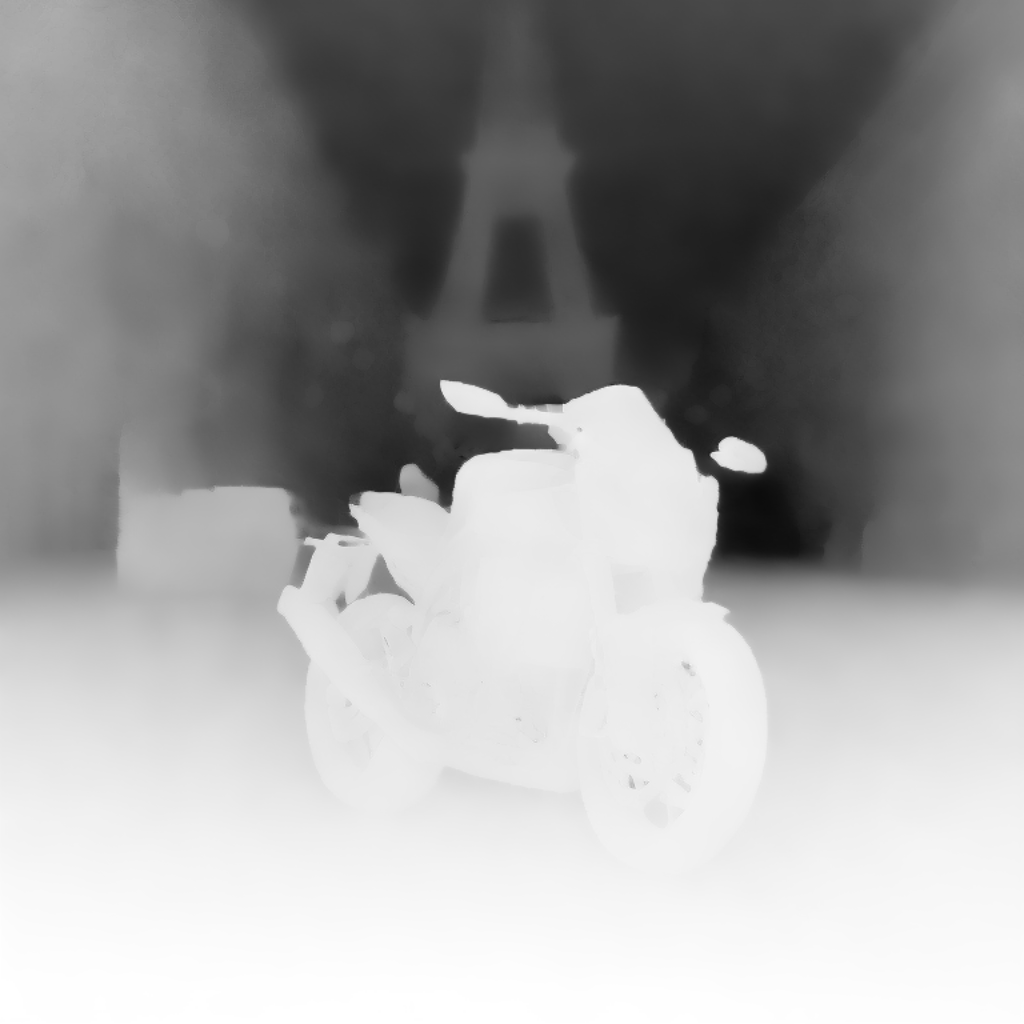
A very common application for depth prediction with diffusion models comes in conjunction with ControlNet. Depth crispness plays a crucial role in obtaining high-quality results from ControlNet. As seen in comparisons with other methods above, Marigold excels at that task. The snippet below demonstrates how to load an image, compute depth, and pass it into ControlNet in a compatible format:
import torch
import diffusers

device = "cuda"
generator = torch.Generator(device=device).manual_seed(2024)
image = diffusers.utils.load_image(
    "https://huggingface.co/datasets/huggingface/documentation-images/resolve/main/diffusers/controlnet_depth_source.png"
)

pipe = diffusers.MarigoldDepthPipeline.from_pretrained(
    "prs-eth/marigold-depth-v1-1", torch_dtype=torch.float16, variant="fp16"
).to(device)

depth_image = pipe(image, generator=generator).prediction
depth_image = pipe.image_processor.visualize_depth(depth_image, color_map="binary")
depth_image[0].save("motorcycle_controlnet_depth.png")

controlnet = diffusers.ControlNetModel.from_pretrained(
    "diffusers/controlnet-depth-sdxl-1.0", torch_dtype=torch.float16, variant="fp16"
).to(device)
pipe = diffusers.StableDiffusionXLControlNetPipeline.from_pretrained(
    "SG161222/RealVisXL_V4.0", torch_dtype=torch.float16, variant="fp16", controlnet=controlnet
).to(device)
pipe.scheduler = diffusers.DPMSolverMultistepScheduler.from_config(pipe.scheduler.config, use_karras_sigmas=True)

controlnet_out = pipe(
    prompt="high quality photo of a sports bike, city",
    negative_prompt="",
    guidance_scale=6.5,
    num_inference_steps=25,
    image=depth_image,
    controlnet_conditioning_scale=0.7,
    control_guidance_end=0.7,
    generator=generator,
).images
controlnet_out[0].save("motorcycle_controlnet_out.png")

Quantitative Evaluation
To evaluate Marigold quantitatively in standard leaderboards and benchmarks (such as NYU, KITTI, and other datasets),
follow the evaluation protocol outlined in the paper: load the full precision fp32 model and use appropriate values
for num_inference_steps and ensemble_size.
Optionally seed randomness to ensure reproducibility.
Maximizing batch_size will deliver maximum device utilization.
import diffusers
import torch

device = "cuda"
seed = 2024

generator = torch.Generator(device=device).manual_seed(seed)
pipe = diffusers.MarigoldDepthPipeline.from_pretrained("prs-eth/marigold-depth-v1-1").to(device)

image = diffusers.utils.load_image("https://marigoldmonodepth.github.io/images/einstein.jpg")

depth = pipe(
    image,
    num_inference_steps=4,  # set according to the evaluation protocol from the paper
    ensemble_size=10,       # set according to the evaluation protocol from the paper
    generator=generator,
)

# evaluate metrics
Using Predictive Uncertainty
The ensembling mechanism built into Marigold pipelines combines multiple predictions obtained from different random
latents.
As a side effect, it can be used to quantify epistemic (model) uncertainty; simply specify ensemble_size greater
or equal than 3 and set output_uncertainty=True.
The resulting uncertainty will be available in the uncertainty field of the output.
It can be visualized as follows:
import diffusers
import torch

pipe = diffusers.MarigoldDepthPipeline.from_pretrained(
    "prs-eth/marigold-depth-v1-1", variant="fp16", torch_dtype=torch.float16
).to("cuda")

image = diffusers.utils.load_image("https://marigoldmonodepth.github.io/images/einstein.jpg")

depth = pipe(
	image,
	ensemble_size=10,  # any number >= 3
	output_uncertainty=True,
)

uncertainty = pipe.image_processor.visualize_uncertainty(depth.uncertainty)
uncertainty[0].save("einstein_depth_uncertainty.png")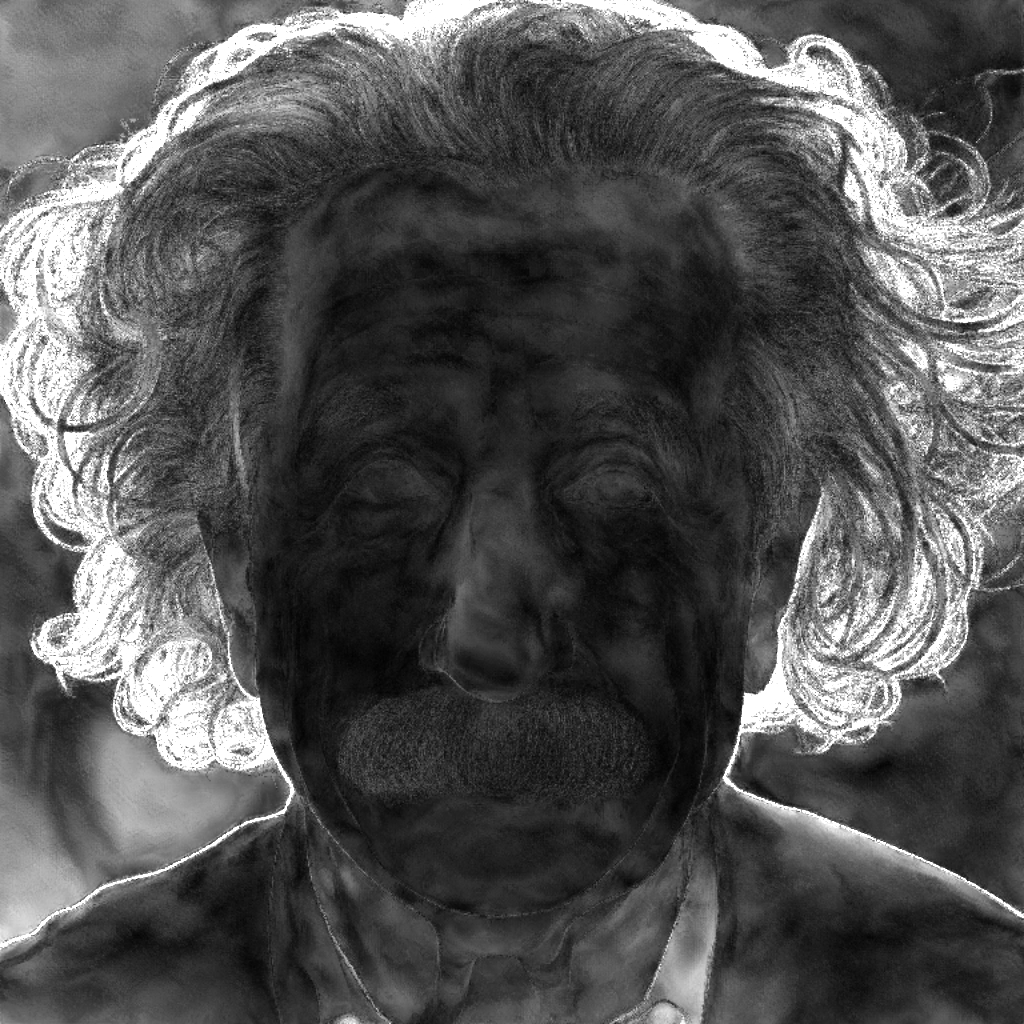
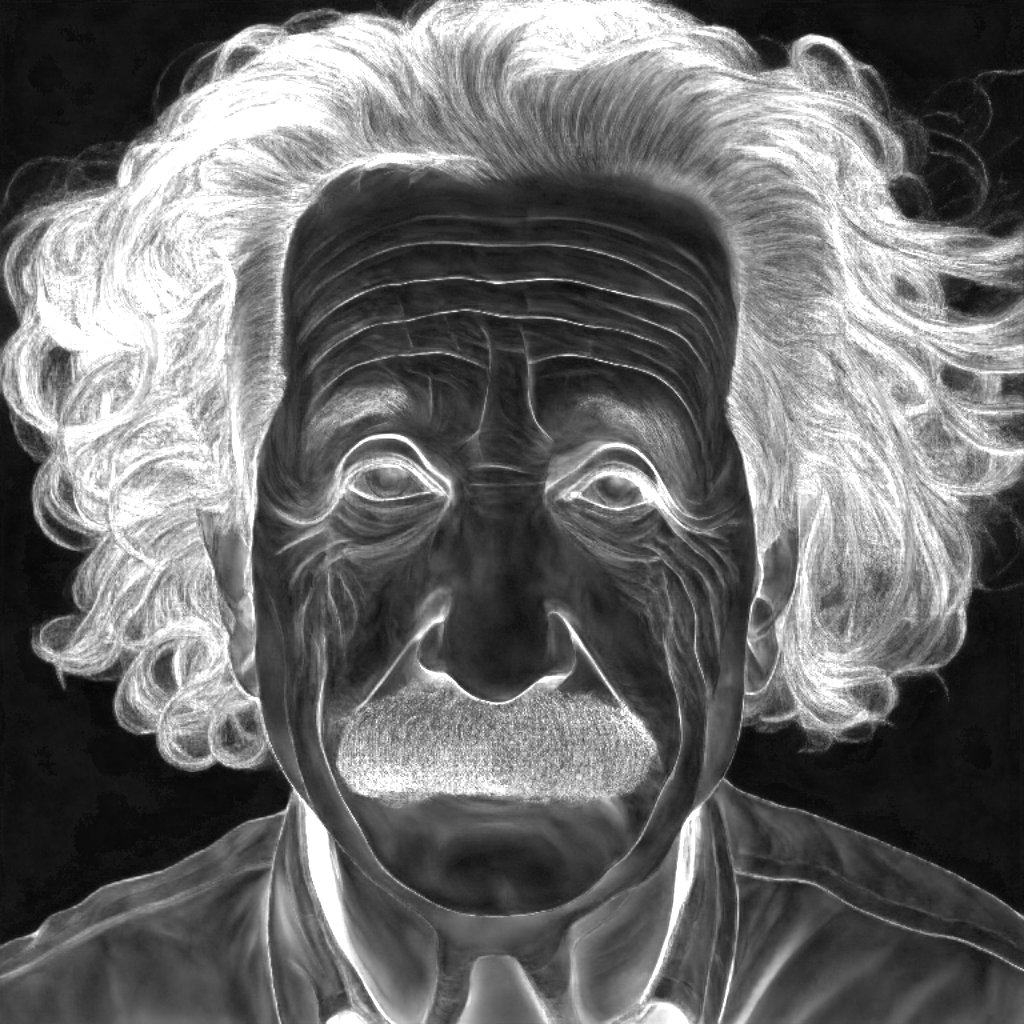

The interpretation of uncertainty is easy: higher values (white) correspond to pixels, where the model struggles to make consistent predictions.
- The depth model exhibits the most uncertainty around discontinuities, where object depth changes abruptly.
- The surface normals model is least confident in fine-grained structures like hair and in dark regions such as the collar area.
- Albedo uncertainty is represented as an RGB image, as it captures uncertainty independently for each color channel, unlike depth and surface normals. It is also higher in shaded regions and at discontinuities.
Marigold Depth Prediction API
class diffusers.MarigoldDepthPipeline
< source >( unet: UNet2DConditionModel vae: AutoencoderKL scheduler: diffusers.schedulers.scheduling_ddim.DDIMScheduler | diffusers.schedulers.scheduling_lcm.LCMScheduler text_encoder: CLIPTextModel tokenizer: CLIPTokenizer prediction_type: str | None = None scale_invariant: bool | None = True shift_invariant: bool | None = True default_denoising_steps: int | None = None default_processing_resolution: int | None = None )
Parameters
- unet (
UNet2DConditionModel) — Conditional U-Net to denoise the depth latent, conditioned on image latent. - vae (
AutoencoderKL) — Variational Auto-Encoder (VAE) Model to encode and decode images and predictions to and from latent representations. - scheduler (
DDIMSchedulerorLCMScheduler) — A scheduler to be used in combination withunetto denoise the encoded image latents. - text_encoder (
CLIPTextModel) — Text-encoder, for empty text embedding. - tokenizer (
CLIPTokenizer) — CLIP tokenizer. - prediction_type (
str, optional) — Type of predictions made by the model. - scale_invariant (
bool, optional) — A model property specifying whether the predicted depth maps are scale-invariant. This value must be set in the model config. When used together with theshift_invariant=Trueflag, the model is also called “affine-invariant”. NB: overriding this value is not supported. - shift_invariant (
bool, optional) — A model property specifying whether the predicted depth maps are shift-invariant. This value must be set in the model config. When used together with thescale_invariant=Trueflag, the model is also called “affine-invariant”. NB: overriding this value is not supported. - default_denoising_steps (
int, optional) — The minimum number of denoising diffusion steps that are required to produce a prediction of reasonable quality with the given model. This value must be set in the model config. When the pipeline is called without explicitly settingnum_inference_steps, the default value is used. This is required to ensure reasonable results with various model flavors compatible with the pipeline, such as those relying on very short denoising schedules (LCMScheduler) and those with full diffusion schedules (DDIMScheduler). - default_processing_resolution (
int, optional) — The recommended value of theprocessing_resolutionparameter of the pipeline. This value must be set in the model config. When the pipeline is called without explicitly settingprocessing_resolution, the default value is used. This is required to ensure reasonable results with various model flavors trained with varying optimal processing resolution values.
Pipeline for monocular depth estimation using the Marigold method: https://marigoldmonodepth.github.io.
This model inherits from DiffusionPipeline. Check the superclass documentation for the generic methods the library implements for all the pipelines (such as downloading or saving, running on a particular device, etc.)
__call__
< source >( image: PIL.Image.Image | numpy.ndarray | torch.Tensor | list[PIL.Image.Image] | list[numpy.ndarray] | list[torch.Tensor] num_inference_steps: int | None = None ensemble_size: int = 1 processing_resolution: int | None = None match_input_resolution: bool = True resample_method_input: str = 'bilinear' resample_method_output: str = 'bilinear' batch_size: int = 1 ensembling_kwargs: dict[str, typing.Any] | None = None latents: torch.Tensor | list[torch.Tensor] | None = None generator: torch._C.Generator | list[torch._C.Generator] | None = None output_type: str = 'np' output_uncertainty: bool = False output_latent: bool = False return_dict: bool = True ) → MarigoldDepthOutput or tuple
Parameters
- image (
PIL.Image.Image,np.ndarray,torch.Tensor,list[PIL.Image.Image],list[np.ndarray]), —list[torch.Tensor]: An input image or images used as an input for the depth estimation task. For arrays and tensors, the expected value range is between[0, 1]. Passing a batch of images is possible by providing a four-dimensional array or a tensor. Additionally, a list of images of two- or three-dimensional arrays or tensors can be passed. In the latter case, all list elements must have the same width and height. - num_inference_steps (
int, optional, defaults toNone) — Number of denoising diffusion steps during inference. The default valueNoneresults in automatic selection. - ensemble_size (
int, defaults to1) — Number of ensemble predictions. Higher values result in measurable improvements and visual degradation. - processing_resolution (
int, optional, defaults toNone) — Effective processing resolution. When set to0, matches the larger input image dimension. This produces crisper predictions, but may also lead to the overall loss of global context. The default valueNoneresolves to the optimal value from the model config. - match_input_resolution (
bool, optional, defaults toTrue) — When enabled, the output prediction is resized to match the input dimensions. When disabled, the longer side of the output will equal toprocessing_resolution. - resample_method_input (
str, optional, defaults to"bilinear") — Resampling method used to resize input images toprocessing_resolution. The accepted values are:"nearest","nearest-exact","bilinear","bicubic", or"area". - resample_method_output (
str, optional, defaults to"bilinear") — Resampling method used to resize output predictions to match the input resolution. The accepted values are"nearest","nearest-exact","bilinear","bicubic", or"area". - batch_size (
int, optional, defaults to1) — Batch size; only matters when settingensemble_sizeor passing a tensor of images. - ensembling_kwargs (
dict, optional, defaults toNone) — Extra dictionary with arguments for precise ensembling control. The following options are available:- reduction (
str, optional, defaults to"median"): Defines the ensembling function applied in every pixel location, can be either"median"or"mean". - regularizer_strength (
float, optional, defaults to0.02): Strength of the regularizer that pulls the aligned predictions to the unit range from 0 to 1. - max_iter (
int, optional, defaults to2): Maximum number of the alignment solver steps. Refer toscipy.optimize.minimizefunction,optionsargument. - tol (
float, optional, defaults to1e-3): Alignment solver tolerance. The solver stops when the tolerance is reached. - max_res (
int, optional, defaults toNone): Resolution at which the alignment is performed;Nonematches theprocessing_resolution.
- reduction (
- latents (
torch.Tensor, orlist[torch.Tensor], optional, defaults toNone) — Latent noise tensors to replace the random initialization. These can be taken from the previous function call’s output. - generator (
torch.Generator, orlist[torch.Generator], optional, defaults toNone) — Random number generator object to ensure reproducibility. - output_type (
str, optional, defaults to"np") — Preferred format of the output’spredictionand the optionaluncertaintyfields. The accepted values are:"np"(numpy array) or"pt"(torch tensor). - output_uncertainty (
bool, optional, defaults toFalse) — When enabled, the output’suncertaintyfield contains the predictive uncertainty map, provided that theensemble_sizeargument is set to a value above 2. - output_latent (
bool, optional, defaults toFalse) — When enabled, the output’slatentfield contains the latent codes corresponding to the predictions within the ensemble. These codes can be saved, modified, and used for subsequent calls with thelatentsargument. - return_dict (
bool, optional, defaults toTrue) — Whether or not to return a MarigoldDepthOutput instead of a plain tuple.
Returns
MarigoldDepthOutput or tuple
If return_dict is True, MarigoldDepthOutput is returned, otherwise a
tuple is returned where the first element is the prediction, the second element is the uncertainty
(or None), and the third is the latent (or None).
Function invoked when calling the pipeline.
Examples:
>>> import diffusers
>>> import torch

>>> pipe = diffusers.MarigoldDepthPipeline.from_pretrained(
...     "prs-eth/marigold-depth-v1-1", variant="fp16", torch_dtype=torch.float16
... ).to("cuda")

>>> image = diffusers.utils.load_image("https://marigoldmonodepth.github.io/images/einstein.jpg")
>>> depth = pipe(image)

>>> vis = pipe.image_processor.visualize_depth(depth.prediction)
>>> vis[0].save("einstein_depth.png")

>>> depth_16bit = pipe.image_processor.export_depth_to_16bit_png(depth.prediction)
>>> depth_16bit[0].save("einstein_depth_16bit.png")
class diffusers.pipelines.marigold.MarigoldDepthOutput
< source >( prediction: numpy.ndarray | torch.Tensor uncertainty: None | numpy.ndarray | torch.Tensor latent: None | torch.Tensor )
Parameters
- prediction (
np.ndarray,torch.Tensor) — Predicted depth maps with values in the range [0, 1]. The shape isnumimages × 1 × height × widthfortorch.Tensorornumimages × height × width × 1fornp.ndarray. - uncertainty (
None,np.ndarray,torch.Tensor) — Uncertainty maps computed from the ensemble, with values in the range [0, 1]. The shape isnumimages × 1 × height × widthfortorch.Tensorornumimages × height × width × 1fornp.ndarray. - latent (
None,torch.Tensor) — Latent features corresponding to the predictions, compatible with thelatentsargument of the pipeline. The shape isnumimages * numensemble × 4 × latentheight × latentwidth.
Output class for Marigold monocular depth prediction pipeline.
diffusers.pipelines.marigold.MarigoldImageProcessor.visualize_depth
< source >( depth: PIL.Image.Image | numpy.ndarray | torch.Tensor | list[PIL.Image.Image] | list[numpy.ndarray] | list[torch.Tensor] val_min: float = 0.0 val_max: float = 1.0 color_map: str = 'Spectral' )
Parameters
- depth (
PIL.Image.Image | np.ndarray | torch.Tensor | list[PIL.Image.Image, list[np.ndarray], -- list[torch.Tensor]]): Depth maps. - val_min (
float, optional, defaults to0.0) — Minimum value of the visualized depth range. - val_max (
float, optional, defaults to1.0) — Maximum value of the visualized depth range. - color_map (
str, optional, defaults to"Spectral") — Color map used to convert a single-channel depth prediction into colored representation.
Visualizes depth maps, such as predictions of the MarigoldDepthPipeline.
Returns: list[PIL.Image.Image] with depth maps visualization.
Marigold Normals Estimation API
class diffusers.MarigoldNormalsPipeline
< source >( unet: UNet2DConditionModel vae: AutoencoderKL scheduler: diffusers.schedulers.scheduling_ddim.DDIMScheduler | diffusers.schedulers.scheduling_lcm.LCMScheduler text_encoder: CLIPTextModel tokenizer: CLIPTokenizer prediction_type: str | None = None use_full_z_range: bool | None = True default_denoising_steps: int | None = None default_processing_resolution: int | None = None )
Parameters
- unet (
UNet2DConditionModel) — Conditional U-Net to denoise the normals latent, conditioned on image latent. - vae (
AutoencoderKL) — Variational Auto-Encoder (VAE) Model to encode and decode images and predictions to and from latent representations. - scheduler (
DDIMSchedulerorLCMScheduler) — A scheduler to be used in combination withunetto denoise the encoded image latents. - text_encoder (
CLIPTextModel) — Text-encoder, for empty text embedding. - tokenizer (
CLIPTokenizer) — CLIP tokenizer. - prediction_type (
str, optional) — Type of predictions made by the model. - use_full_z_range (
bool, optional) — Whether the normals predicted by this model utilize the full range of the Z dimension, or only its positive half. - default_denoising_steps (
int, optional) — The minimum number of denoising diffusion steps that are required to produce a prediction of reasonable quality with the given model. This value must be set in the model config. When the pipeline is called without explicitly settingnum_inference_steps, the default value is used. This is required to ensure reasonable results with various model flavors compatible with the pipeline, such as those relying on very short denoising schedules (LCMScheduler) and those with full diffusion schedules (DDIMScheduler). - default_processing_resolution (
int, optional) — The recommended value of theprocessing_resolutionparameter of the pipeline. This value must be set in the model config. When the pipeline is called without explicitly settingprocessing_resolution, the default value is used. This is required to ensure reasonable results with various model flavors trained with varying optimal processing resolution values.
Pipeline for monocular normals estimation using the Marigold method: https://marigoldmonodepth.github.io.
This model inherits from DiffusionPipeline. Check the superclass documentation for the generic methods the library implements for all the pipelines (such as downloading or saving, running on a particular device, etc.)
__call__
< source >( image: PIL.Image.Image | numpy.ndarray | torch.Tensor | list[PIL.Image.Image] | list[numpy.ndarray] | list[torch.Tensor] num_inference_steps: int | None = None ensemble_size: int = 1 processing_resolution: int | None = None match_input_resolution: bool = True resample_method_input: str = 'bilinear' resample_method_output: str = 'bilinear' batch_size: int = 1 ensembling_kwargs: dict[str, typing.Any] | None = None latents: torch.Tensor | list[torch.Tensor] | None = None generator: torch._C.Generator | list[torch._C.Generator] | None = None output_type: str = 'np' output_uncertainty: bool = False output_latent: bool = False return_dict: bool = True ) → MarigoldNormalsOutput or tuple
Parameters
- image (
PIL.Image.Image,np.ndarray,torch.Tensor,list[PIL.Image.Image],list[np.ndarray]), —list[torch.Tensor]: An input image or images used as an input for the normals estimation task. For arrays and tensors, the expected value range is between[0, 1]. Passing a batch of images is possible by providing a four-dimensional array or a tensor. Additionally, a list of images of two- or three-dimensional arrays or tensors can be passed. In the latter case, all list elements must have the same width and height. - num_inference_steps (
int, optional, defaults toNone) — Number of denoising diffusion steps during inference. The default valueNoneresults in automatic selection. - ensemble_size (
int, defaults to1) — Number of ensemble predictions. Higher values result in measurable improvements and visual degradation. - processing_resolution (
int, optional, defaults toNone) — Effective processing resolution. When set to0, matches the larger input image dimension. This produces crisper predictions, but may also lead to the overall loss of global context. The default valueNoneresolves to the optimal value from the model config. - match_input_resolution (
bool, optional, defaults toTrue) — When enabled, the output prediction is resized to match the input dimensions. When disabled, the longer side of the output will equal toprocessing_resolution. - resample_method_input (
str, optional, defaults to"bilinear") — Resampling method used to resize input images toprocessing_resolution. The accepted values are:"nearest","nearest-exact","bilinear","bicubic", or"area". - resample_method_output (
str, optional, defaults to"bilinear") — Resampling method used to resize output predictions to match the input resolution. The accepted values are"nearest","nearest-exact","bilinear","bicubic", or"area". - batch_size (
int, optional, defaults to1) — Batch size; only matters when settingensemble_sizeor passing a tensor of images. - ensembling_kwargs (
dict, optional, defaults toNone) — Extra dictionary with arguments for precise ensembling control. The following options are available:- reduction (
str, optional, defaults to"closest"): Defines the ensembling function applied in every pixel location, can be either"closest"or"mean".
- reduction (
- latents (
torch.Tensor, optional, defaults toNone) — Latent noise tensors to replace the random initialization. These can be taken from the previous function call’s output. - generator (
torch.Generator, orlist[torch.Generator], optional, defaults toNone) — Random number generator object to ensure reproducibility. - output_type (
str, optional, defaults to"np") — Preferred format of the output’spredictionand the optionaluncertaintyfields. The accepted values are:"np"(numpy array) or"pt"(torch tensor). - output_uncertainty (
bool, optional, defaults toFalse) — When enabled, the output’suncertaintyfield contains the predictive uncertainty map, provided that theensemble_sizeargument is set to a value above 2. - output_latent (
bool, optional, defaults toFalse) — When enabled, the output’slatentfield contains the latent codes corresponding to the predictions within the ensemble. These codes can be saved, modified, and used for subsequent calls with thelatentsargument. - return_dict (
bool, optional, defaults toTrue) — Whether or not to return a MarigoldNormalsOutput instead of a plain tuple.
Returns
MarigoldNormalsOutput or tuple
If return_dict is True, MarigoldNormalsOutput is returned, otherwise a
tuple is returned where the first element is the prediction, the second element is the uncertainty
(or None), and the third is the latent (or None).
Function invoked when calling the pipeline.
Examples:
>>> import diffusers
>>> import torch

>>> pipe = diffusers.MarigoldNormalsPipeline.from_pretrained(
...     "prs-eth/marigold-normals-v1-1", variant="fp16", torch_dtype=torch.float16
... ).to("cuda")

>>> image = diffusers.utils.load_image("https://marigoldmonodepth.github.io/images/einstein.jpg")
>>> normals = pipe(image)

>>> vis = pipe.image_processor.visualize_normals(normals.prediction)
>>> vis[0].save("einstein_normals.png")
class diffusers.pipelines.marigold.MarigoldNormalsOutput
< source >( prediction: numpy.ndarray | torch.Tensor uncertainty: None | numpy.ndarray | torch.Tensor latent: None | torch.Tensor )
Parameters
- prediction (
np.ndarray,torch.Tensor) — Predicted normals with values in the range [-1, 1]. The shape isnumimages × 3 × height × widthfortorch.Tensorornumimages × height × width × 3fornp.ndarray. - uncertainty (
None,np.ndarray,torch.Tensor) — Uncertainty maps computed from the ensemble, with values in the range [0, 1]. The shape isnumimages × 1 × height × widthfortorch.Tensorornumimages × height × width × 1fornp.ndarray. - latent (
None,torch.Tensor) — Latent features corresponding to the predictions, compatible with thelatentsargument of the pipeline. The shape isnumimages * numensemble × 4 × latentheight × latentwidth.
Output class for Marigold monocular normals prediction pipeline.
diffusers.pipelines.marigold.MarigoldImageProcessor.visualize_normals
< source >( normals: numpy.ndarray | torch.Tensor | list[numpy.ndarray] | list[torch.Tensor] flip_x: bool = False flip_y: bool = False flip_z: bool = False )
Parameters
- normals (
np.ndarray | torch.Tensor | list[np.ndarray, list[torch.Tensor]]) — Surface normals. - flip_x (
bool, optional, defaults toFalse) — Flips the X axis of the normals frame of reference. Default direction is right. - flip_y (
bool, optional, defaults toFalse) — Flips the Y axis of the normals frame of reference. Default direction is top. - flip_z (
bool, optional, defaults toFalse) — Flips the Z axis of the normals frame of reference. Default direction is facing the observer.
Visualizes surface normals, such as predictions of the MarigoldNormalsPipeline.
Returns: list[PIL.Image.Image] with surface normals visualization.
Marigold Intrinsic Image Decomposition API
class diffusers.MarigoldIntrinsicsPipeline
< source >( unet: UNet2DConditionModel vae: AutoencoderKL scheduler: diffusers.schedulers.scheduling_ddim.DDIMScheduler | diffusers.schedulers.scheduling_lcm.LCMScheduler text_encoder: CLIPTextModel tokenizer: CLIPTokenizer prediction_type: str | None = None target_properties: dict[str, typing.Any] | None = None default_denoising_steps: int | None = None default_processing_resolution: int | None = None )
Parameters
- unet (
UNet2DConditionModel) — Conditional U-Net to denoise the targets latent, conditioned on image latent. - vae (
AutoencoderKL) — Variational Auto-Encoder (VAE) Model to encode and decode images and predictions to and from latent representations. - scheduler (
DDIMSchedulerorLCMScheduler) — A scheduler to be used in combination withunetto denoise the encoded image latents. - text_encoder (
CLIPTextModel) — Text-encoder, for empty text embedding. - tokenizer (
CLIPTokenizer) — CLIP tokenizer. - prediction_type (
str, optional) — Type of predictions made by the model. - target_properties (
dict[str, Any], optional) — Properties of the predicted modalities, such astarget_names, alist[str]used to define the number, order and names of the predicted modalities, and any other metadata that may be required to interpret the predictions. - default_denoising_steps (
int, optional) — The minimum number of denoising diffusion steps that are required to produce a prediction of reasonable quality with the given model. This value must be set in the model config. When the pipeline is called without explicitly settingnum_inference_steps, the default value is used. This is required to ensure reasonable results with various model flavors compatible with the pipeline, such as those relying on very short denoising schedules (LCMScheduler) and those with full diffusion schedules (DDIMScheduler). - default_processing_resolution (
int, optional) — The recommended value of theprocessing_resolutionparameter of the pipeline. This value must be set in the model config. When the pipeline is called without explicitly settingprocessing_resolution, the default value is used. This is required to ensure reasonable results with various model flavors trained with varying optimal processing resolution values.
Pipeline for Intrinsic Image Decomposition (IID) using the Marigold method: https://marigoldcomputervision.github.io.
This model inherits from DiffusionPipeline. Check the superclass documentation for the generic methods the library implements for all the pipelines (such as downloading or saving, running on a particular device, etc.)
__call__
< source >( image: PIL.Image.Image | numpy.ndarray | torch.Tensor | list[PIL.Image.Image] | list[numpy.ndarray] | list[torch.Tensor] num_inference_steps: int | None = None ensemble_size: int = 1 processing_resolution: int | None = None match_input_resolution: bool = True resample_method_input: str = 'bilinear' resample_method_output: str = 'bilinear' batch_size: int = 1 ensembling_kwargs: dict[str, typing.Any] | None = None latents: torch.Tensor | list[torch.Tensor] | None = None generator: torch._C.Generator | list[torch._C.Generator] | None = None output_type: str = 'np' output_uncertainty: bool = False output_latent: bool = False return_dict: bool = True ) → MarigoldIntrinsicsOutput or tuple
Parameters
- image (
PIL.Image.Image,np.ndarray,torch.Tensor,list[PIL.Image.Image],list[np.ndarray]), —list[torch.Tensor]: An input image or images used as an input for the intrinsic decomposition task. For arrays and tensors, the expected value range is between[0, 1]. Passing a batch of images is possible by providing a four-dimensional array or a tensor. Additionally, a list of images of two- or three-dimensional arrays or tensors can be passed. In the latter case, all list elements must have the same width and height. - num_inference_steps (
int, optional, defaults toNone) — Number of denoising diffusion steps during inference. The default valueNoneresults in automatic selection. - ensemble_size (
int, defaults to1) — Number of ensemble predictions. Higher values result in measurable improvements and visual degradation. - processing_resolution (
int, optional, defaults toNone) — Effective processing resolution. When set to0, matches the larger input image dimension. This produces crisper predictions, but may also lead to the overall loss of global context. The default valueNoneresolves to the optimal value from the model config. - match_input_resolution (
bool, optional, defaults toTrue) — When enabled, the output prediction is resized to match the input dimensions. When disabled, the longer side of the output will equal toprocessing_resolution. - resample_method_input (
str, optional, defaults to"bilinear") — Resampling method used to resize input images toprocessing_resolution. The accepted values are:"nearest","nearest-exact","bilinear","bicubic", or"area". - resample_method_output (
str, optional, defaults to"bilinear") — Resampling method used to resize output predictions to match the input resolution. The accepted values are"nearest","nearest-exact","bilinear","bicubic", or"area". - batch_size (
int, optional, defaults to1) — Batch size; only matters when settingensemble_sizeor passing a tensor of images. - ensembling_kwargs (
dict, optional, defaults toNone) — Extra dictionary with arguments for precise ensembling control. The following options are available:- reduction (
str, optional, defaults to"median"): Defines the ensembling function applied in every pixel location, can be either"median"or"mean".
- reduction (
- latents (
torch.Tensor, optional, defaults toNone) — Latent noise tensors to replace the random initialization. These can be taken from the previous function call’s output. - generator (
torch.Generator, orlist[torch.Generator], optional, defaults toNone) — Random number generator object to ensure reproducibility. - output_type (
str, optional, defaults to"np") — Preferred format of the output’spredictionand the optionaluncertaintyfields. The accepted values are:"np"(numpy array) or"pt"(torch tensor). - output_uncertainty (
bool, optional, defaults toFalse) — When enabled, the output’suncertaintyfield contains the predictive uncertainty map, provided that theensemble_sizeargument is set to a value above 2. - output_latent (
bool, optional, defaults toFalse) — When enabled, the output’slatentfield contains the latent codes corresponding to the predictions within the ensemble. These codes can be saved, modified, and used for subsequent calls with thelatentsargument. - return_dict (
bool, optional, defaults toTrue) — Whether or not to return a MarigoldIntrinsicsOutput instead of a plain tuple.
Returns
MarigoldIntrinsicsOutput or tuple
If return_dict is True, MarigoldIntrinsicsOutput is returned, otherwise a
tuple is returned where the first element is the prediction, the second element is the uncertainty
(or None), and the third is the latent (or None).
Function invoked when calling the pipeline.
Examples:
>>> import diffusers
>>> import torch

>>> pipe = diffusers.MarigoldIntrinsicsPipeline.from_pretrained(
...     "prs-eth/marigold-iid-appearance-v1-1", variant="fp16", torch_dtype=torch.float16
... ).to("cuda")

>>> image = diffusers.utils.load_image("https://marigoldmonodepth.github.io/images/einstein.jpg")
>>> intrinsics = pipe(image)

>>> vis = pipe.image_processor.visualize_intrinsics(intrinsics.prediction, pipe.target_properties)
>>> vis[0]["albedo"].save("einstein_albedo.png")
>>> vis[0]["roughness"].save("einstein_roughness.png")
>>> vis[0]["metallicity"].save("einstein_metallicity.png")>>> import diffusers
>>> import torch
>>> pipe = diffusers.MarigoldIntrinsicsPipeline.from_pretrained(
... "prs-eth/marigold-iid-lighting-v1-1", variant="fp16", torch_dtype=torch.float16
... ).to("cuda")
>>> image = diffusers.utils.load_image("https://marigoldmonodepth.github.io/images/einstein.jpg")
>>> intrinsics = pipe(image)
>>> vis = pipe.image_processor.visualize_intrinsics(intrinsics.prediction, pipe.target_properties)
>>> vis[0]["albedo"].save("einstein_albedo.png")
>>> vis[0]["shading"].save("einstein_shading.png")
>>> vis[0]["residual"].save("einstein_residual.png")class diffusers.pipelines.marigold.MarigoldIntrinsicsOutput
< source >( prediction: numpy.ndarray | torch.Tensor uncertainty: None | numpy.ndarray | torch.Tensor latent: None | torch.Tensor )
Parameters
- prediction (
np.ndarray,torch.Tensor) — Predicted image intrinsics with values in the range [0, 1]. The shape is(numimages * numtargets) × 3 × height × widthfortorch.Tensoror(numimages * numtargets) × height × width × 3fornp.ndarray, wherenumtargetscorresponds to the number of predicted target modalities of the intrinsic image decomposition. - uncertainty (
None,np.ndarray,torch.Tensor) — Uncertainty maps computed from the ensemble, with values in the range [0, 1]. The shape is(numimages * numtargets) × 3 × height × widthfortorch.Tensoror(numimages * numtargets) × height × width × 3fornp.ndarray. - latent (
None,torch.Tensor) — Latent features corresponding to the predictions, compatible with thelatentsargument of the pipeline. The shape is(numimages * numensemble) × (numtargets * 4) × latentheight × latentwidth.
Output class for Marigold Intrinsic Image Decomposition pipeline.
diffusers.pipelines.marigold.MarigoldImageProcessor.visualize_intrinsics
< source >( prediction: numpy.ndarray | torch.Tensor | list[numpy.ndarray] | list[torch.Tensor] target_properties: dict color_map: str | dict[str, str] = 'binary' )
Parameters
- prediction (
np.ndarray | torch.Tensor | list[np.ndarray, list[torch.Tensor]]) — Intrinsic image decomposition. - target_properties (
dict[str, Any]) — Decomposition properties. Expected entries:target_names: list[str]and a dictionary with keysprediction_space: str,sub_target_names: list[str | Null](must have 3 entries, null for missing modalities),up_to_scale: bool, one for each target and sub-target. - color_map (
str | dict[str, str], optional, defaults to"Spectral") — Color map used to convert a single-channel predictions into colored representations. When a dictionary is passed, each modality can be colored with its own color map.
Visualizes intrinsic image decomposition, such as predictions of the MarigoldIntrinsicsPipeline.
Returns: list[dict[str, PIL.Image.Image]] with intrinsic image decomposition visualization.