
Diffusers documentation
Stable Diffusion 3
Stable Diffusion 3


Stable Diffusion 3 (SD3) 由 Patrick Esser、Sumith Kulal、Andreas Blattmann、Rahim Entezari、Jonas Muller、Harry Saini、Yam Levi、Dominik Lorenz、Axel Sauer、Frederic Boesel、Dustin Podell、Tim Dockhorn、Zion English、Kyle Lacey、Alex Goodwin、Yannik Marek 和 Robin Rombach 在 Scaling Rectified Flow Transformers for High-Resolution Image Synthesis 中提出。
该论文的摘要如下:
扩散模型通过逆转数据向噪声演化的前向过程,从噪声中生成数据,已成为一种强大的生成建模技术,适用于图像和视频等高维感知数据。Rectified flow 是一种近期的生成模型表述,它通过一条直线连接数据与噪声。尽管其具有更优的理论性质和概念上的简洁性,但尚未被明确确立为标准实践。在本工作中,我们通过将现有噪声采样技术偏向于感知相关的尺度,改进了用于训练 rectified flow 模型的噪声采样方法。通过大规模研究,我们证明了该方法在高分辨率文本到图像合成任务上,相较于成熟的扩散模型表述具有更优的性能。此外,我们提出了一种基于 Transformer 的新型文本到图像生成架构,该架构为两种模态使用独立的权重,并支持图像 token 与文本 token 之间的双向信息流动,从而提升了文本理解、排版效果以及人类偏好评分。我们展示了该架构遵循可预测的缩放趋势,并且较低的验证损失与通过多种指标和人类评估衡量的文本到图像合成质量的提升呈正相关。
使用示例
由于该模型受访问限制,在使用 diffusers 之前,您需要先前往 Stable Diffusion 3 Medium Hugging Face 页面,填写表单并接受访问限制。进入后,您需要登录,以便系统确认您已接受该限制。
使用以下命令登录:
hf auth login
SD3 流水线使用三个文本编码器来生成图像。为了使其能够在大多数普通硬件上运行,必须使用模型卸载。请额外使用
torch.float16数据类型以进一步节省内存。
import torch
from diffusers import StableDiffusion3Pipeline

pipe = StableDiffusion3Pipeline.from_pretrained("stabilityai/stable-diffusion-3-medium-diffusers", dtype=torch.float16)
pipe.to("cuda")  # or "mps", "xpu", "cpu"

image = pipe(
    prompt="a photo of a cat holding a sign that says hello world",
    negative_prompt="",
    num_inference_steps=28,
    height=1024,
    width=1024,
    guidance_scale=7.0,
).images[0]

image.save("sd3_hello_world.png")注意:Stable Diffusion 3.5 也可以使用 SD3 流水线运行,上述所有优化和技术同样适用于它。SD3 系列共有三个官方模型:
stabilityai/stable-diffusion-3-medium-diffusersstabilityai/stable-diffusion-3.5-largestabilityai/stable-diffusion-3.5-large-turbo
使用 IP-Adapter 进行图像提示
IP-Adapter 允许你除了文本提示词之外,还使用图像来提示 SD3。当需要描述仅靠文本难以准确表达的复杂概念,且手头有参考图像时,这一功能尤为实用。要加载并使用 IP-Adapter,你需要:
image_encoder:用于获取图像特征的预训练视觉模型,通常是 CLIP 图像编码器。feature_extractor:图像处理器,用于为所选的image_encoder准备输入图像。ip_adapter_id:包含图像交叉注意力层和图像投影参数的检查点。
IP-Adapter 是针对特定模型架构进行训练的,因此它们同样适用于基础模型的微调变体。你可以使用 ~SD3IPAdapterMixin.set_ip_adapter_scale 函数来调整输出与图像提示之间的对齐强度。数值越高,模型越严格地遵循图像提示。默认值 0.5 通常是一个良好的平衡点,确保模型同等地考虑文本和图像提示。
import torch
from PIL import Image

from diffusers import StableDiffusion3Pipeline
from transformers import SiglipVisionModel, SiglipImageProcessor

image_encoder_id = "google/siglip-so400m-patch14-384"
ip_adapter_id = "InstantX/SD3.5-Large-IP-Adapter"

feature_extractor = SiglipImageProcessor.from_pretrained(
    image_encoder_id,
    dtype=torch.float16
)
image_encoder = SiglipVisionModel.from_pretrained(
    image_encoder_id,
    dtype=torch.float16
).to( "cuda")  # or "mps", "xpu", "cpu"

pipe = StableDiffusion3Pipeline.from_pretrained(
    "stabilityai/stable-diffusion-3.5-large",
    dtype=torch.float16,
    feature_extractor=feature_extractor,
    image_encoder=image_encoder,
).to("cuda")

pipe.load_ip_adapter(ip_adapter_id)
pipe.set_ip_adapter_scale(0.6)

ref_img = Image.open("image.jpg").convert('RGB')

image = pipe(
    width=1024,
    height=1024,
    prompt="a cat",
    negative_prompt="lowres, low quality, worst quality",
    num_inference_steps=24,
    guidance_scale=5.0,
    ip_adapter_image=ref_img
).images[0]

image.save("result.jpg")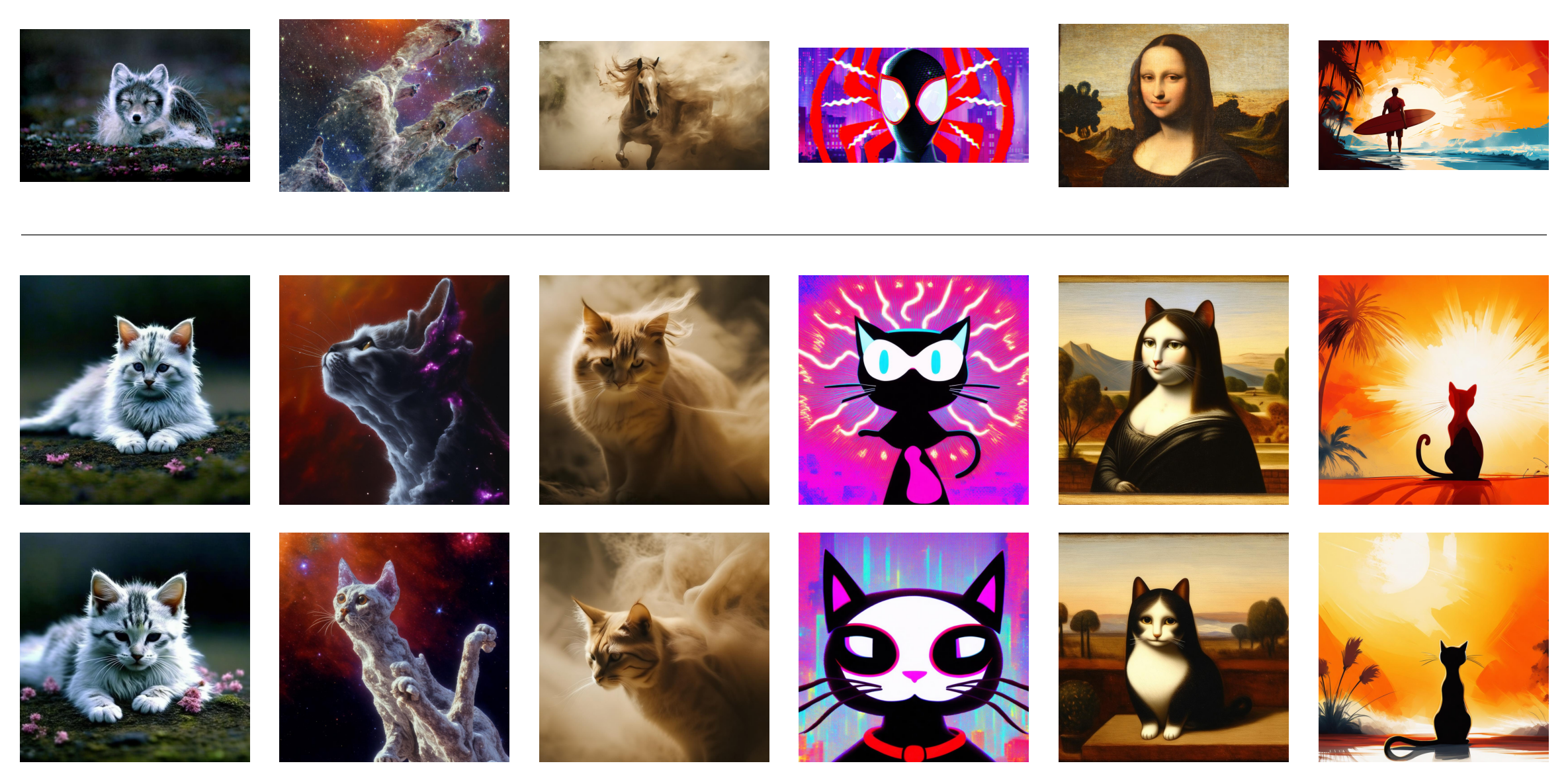
查看 IP-Adapter 以了解 IP-Adapter 的工作原理。
SD3 的内存优化
SD3 使用了三个文本编码器,其中之一是体积庞大的 T5-XXL 模型。这使得在显存小于 24GB 的 GPU 上运行该模型颇具挑战性,即使使用 fp16 精度也是如此。以下部分概述了 Diffusers 中的一些内存优化措施,以便在低资源硬件上更轻松地运行 SD3。
使用模型卸载运行推理
Diffusers 中最基础的内存优化功能允许在推理期间将模型的各个组件卸载到 CPU 上,从而节省内存,但推理延迟会略有增加。模型卸载机制仅在实际需要执行某个组件时才将其移至 GPU,而其余组件则保留在 CPU 上。
import torch
from diffusers import StableDiffusion3Pipeline

pipe = StableDiffusion3Pipeline.from_pretrained("stabilityai/stable-diffusion-3-medium-diffusers", dtype=torch.float16)
pipe.enable_model_cpu_offload()

image = pipe(
    prompt="a photo of a cat holding a sign that says hello world",
    negative_prompt="",
    num_inference_steps=28,
    height=1024,
    width=1024,
    guidance_scale=7.0,
).images[0]

image.save("sd3_hello_world.png")
在推理过程中移除 T5 文本编码器
在推理阶段移除内存占用较大的 4.7B 参数 T5-XXL 文本编码器,可以显著降低 SD3 的内存需求,且性能损失很小。
import torch
from diffusers import StableDiffusion3Pipeline

pipe = StableDiffusion3Pipeline.from_pretrained(
    "stabilityai/stable-diffusion-3-medium-diffusers",
    text_encoder_3=None,
    tokenizer_3=None,
    dtype=torch.float16
)
pipe.to("cuda")  # or "mps", "xpu", "cpu"

image = pipe(
    prompt="a photo of a cat holding a sign that says hello world",
    negative_prompt="",
    num_inference_steps=28,
    height=1024,
    width=1024,
    guidance_scale=7.0,
).images[0]

image.save("sd3_hello_world-no-T5.png")
使用 T5 文本编码器的量化版本
我们可以利用 bitsandbytes 库将 T5-XXL 文本编码器加载并量化为 8 位精度。这样,你可以在仅轻微影响性能的情况下继续使用全部三个文本编码器。
首先安装 bitsandbytes 库。
pip install bitsandbytes
然后使用 BitsAndBytesConfig 加载 T5-XXL 模型。
import torch
from diffusers import StableDiffusion3Pipeline
from transformers import T5EncoderModel, BitsAndBytesConfig

quantization_config = BitsAndBytesConfig(load_in_8bit=True)

model_id = "stabilityai/stable-diffusion-3-medium-diffusers"
text_encoder = T5EncoderModel.from_pretrained(
    model_id,
    subfolder="text_encoder_3",
    quantization_config=quantization_config,
)
pipe = StableDiffusion3Pipeline.from_pretrained(
    model_id,
    text_encoder_3=text_encoder,
    device_map="balanced",
    dtype=torch.float16
)

image = pipe(
    prompt="a photo of a cat holding a sign that says hello world",
    negative_prompt="",
    num_inference_steps=28,
    height=1024,
    width=1024,
    guidance_scale=7.0,
).images[0]

image.save("sd3_hello_world-8bit-T5.png")您可以在此处找到端到端脚本。
SD3 的性能优化
使用 Torch Compile 加速推理
在 SD3 流水线中使用编译后的组件可将推理速度提升多达 4 倍。以下代码片段演示了如何编译 SD3 流水线中的 Transformer 和 VAE 组件。
import torch
from diffusers import StableDiffusion3Pipeline

torch.set_float32_matmul_precision("high")

torch._inductor.config.conv_1x1_as_mm = True
torch._inductor.config.coordinate_descent_tuning = True
torch._inductor.config.epilogue_fusion = False
torch._inductor.config.coordinate_descent_check_all_directions = True

pipe = StableDiffusion3Pipeline.from_pretrained(
    "stabilityai/stable-diffusion-3-medium-diffusers",
    dtype=torch.float16
).to("cuda")  # or "mps", "xpu", "cpu"
pipe.set_progress_bar_config(disable=True)

pipe.transformer.to(memory_format=torch.channels_last)
pipe.vae.to(memory_format=torch.channels_last)

pipe.transformer = torch.compile(pipe.transformer, mode="max-autotune", fullgraph=True)
pipe.vae.decode = torch.compile(pipe.vae.decode, mode="max-autotune", fullgraph=True)

# Warm Up
prompt = "a photo of a cat holding a sign that says hello world"
for _ in range(3):
    _ = pipe(prompt=prompt, generator=torch.manual_seed(1))

# Run Inference
image = pipe(prompt=prompt, generator=torch.manual_seed(1)).images[0]
image.save("sd3_hello_world.png")完整脚本请参见此处。
量化
量化通过以较低精度的数据类型存储模型权重,有助于降低超大模型的内存需求。不过,量化对视频质量的影响会因视频模型的不同而有所差异。
请参阅 量化 概述,以了解支持的量化后端以及如何选择适用于您使用场景的量化后端。以下示例演示了如何使用 bitsandbytes 加载用于推理的量化 StableDiffusion3Pipeline。
import torch
from diffusers import BitsAndBytesConfig as DiffusersBitsAndBytesConfig, SD3Transformer2DModel, StableDiffusion3Pipeline
from transformers import BitsAndBytesConfig as BitsAndBytesConfig, T5EncoderModel

quant_config = BitsAndBytesConfig(load_in_8bit=True)
text_encoder_8bit = T5EncoderModel.from_pretrained(
    "stabilityai/stable-diffusion-3.5-large",
    subfolder="text_encoder_3",
    quantization_config=quant_config,
    dtype=torch.float16,
)

quant_config = DiffusersBitsAndBytesConfig(load_in_8bit=True)
transformer_8bit = SD3Transformer2DModel.from_pretrained(
    "stabilityai/stable-diffusion-3.5-large",
    subfolder="transformer",
    quantization_config=quant_config,
    dtype=torch.float16,
)

pipeline = StableDiffusion3Pipeline.from_pretrained(
    "stabilityai/stable-diffusion-3.5-large",
    text_encoder=text_encoder_8bit,
    transformer=transformer_8bit,
    dtype=torch.float16,
    device_map="balanced",
)

prompt = "a tiny astronaut hatching from an egg on the moon"
image = pipeline(prompt, num_inference_steps=28, guidance_scale=7.0).images[0]
image.save("sd3.png")
使用长提示词与 T5 文本编码器
默认情况下,T5 文本编码器提示词使用的最大序列长度为 256。可以通过设置 max_sequence_length 来接受更少或更多的 token。请注意,更长的序列需要额外的资源,并会导致更长的生成时间,例如在批量推理期间。
prompt = "A whimsical and creative image depicting a hybrid creature that is a mix of a waffle and a hippopotamus, basking in a river of melted butter amidst a breakfast-themed landscape. It features the distinctive, bulky body shape of a hippo. However, instead of the usual grey skin, the creature’s body resembles a golden-brown, crispy waffle fresh off the griddle. The skin is textured with the familiar grid pattern of a waffle, each square filled with a glistening sheen of syrup. The environment combines the natural habitat of a hippo with elements of a breakfast table setting, a river of warm, melted butter, with oversized utensils or plates peeking out from the lush, pancake-like foliage in the background, a towering pepper mill standing in for a tree.  As the sun rises in this fantastical world, it casts a warm, buttery glow over the scene. The creature, content in its butter river, lets out a yawn. Nearby, a flock of birds take flight"

image = pipe(
    prompt=prompt,
    negative_prompt="",
    num_inference_steps=28,
    guidance_scale=4.5,
    max_sequence_length=512,
).images[0]
向 T5 文本编码器发送不同的提示
您可以向 CLIP Text Encoders 和 T5 Text Encoder 发送不同的 prompt,以防止 prompt 被 CLIP Text Encoders 截断,并提升生成效果。
使用 CLIP 文本编码器时,提示词仍会被截断至 77 个 token 的限制。
prompt = "A whimsical and creative image depicting a hybrid creature that is a mix of a waffle and a hippopotamus, basking in a river of melted butter amidst a breakfast-themed landscape. A river of warm, melted butter, pancake-like foliage in the background, a towering pepper mill standing in for a tree."

prompt_3 = "A whimsical and creative image depicting a hybrid creature that is a mix of a waffle and a hippopotamus, basking in a river of melted butter amidst a breakfast-themed landscape. It features the distinctive, bulky body shape of a hippo. However, instead of the usual grey skin, the creature’s body resembles a golden-brown, crispy waffle fresh off the griddle. The skin is textured with the familiar grid pattern of a waffle, each square filled with a glistening sheen of syrup. The environment combines the natural habitat of a hippo with elements of a breakfast table setting, a river of warm, melted butter, with oversized utensils or plates peeking out from the lush, pancake-like foliage in the background, a towering pepper mill standing in for a tree.  As the sun rises in this fantastical world, it casts a warm, buttery glow over the scene. The creature, content in its butter river, lets out a yawn. Nearby, a flock of birds take flight"

image = pipe(
    prompt=prompt,
    prompt_3=prompt_3,
    negative_prompt="",
    num_inference_steps=28,
    guidance_scale=4.5,
    max_sequence_length=512,
).images[0]
用于 Stable Diffusion 3 的微型 AutoEncoder
Stable Diffusion 的微型自编码器(TAESD3)是 Ollin Boer Bohan 对 Stable Diffusion 3 的 VAE 进行蒸馏得到的微型版本,能够几乎即时地解码 StableDiffusion3Pipeline 的潜变量。
要在 Stable Diffusion 3 中使用:
import torch
from diffusers import StableDiffusion3Pipeline, AutoencoderTiny

pipe = StableDiffusion3Pipeline.from_pretrained(
    "stabilityai/stable-diffusion-3-medium-diffusers", dtype=torch.float16
)
pipe.vae = AutoencoderTiny.from_pretrained("madebyollin/taesd3", dtype=torch.float16)
pipe = pipe.to("cuda")  # or "mps", "xpu", "cpu"

prompt = "slice of delicious New York-style berry cheesecake"
image = pipe(prompt, num_inference_steps=25).images[0]
image.save("cheesecake.png")
通过 from_single_file 加载原始检查点
SD3Transformer2DModel 和 StableDiffusion3Pipeline 类支持通过 from_single_file 方法加载原始检查点。该方法允许你加载用于训练模型的原始检查点文件。
加载 SD3Transformer2DModel 的原始检查点
from diffusers import SD3Transformer2DModel

model = SD3Transformer2DModel.from_single_file("https://huggingface.co/stabilityai/stable-diffusion-3-medium/blob/main/sd3_medium.safetensors")
加载 StableDiffusion3Pipeline 的单个检查点
在不使用 T5 的情况下加载单文件检查点
import torch
from diffusers import StableDiffusion3Pipeline

pipe = StableDiffusion3Pipeline.from_single_file(
    "https://huggingface.co/stabilityai/stable-diffusion-3-medium/blob/main/sd3_medium_incl_clips.safetensors",
    dtype=torch.float16,
    text_encoder_3=None
)
pipe.enable_model_cpu_offload()

image = pipe("a picture of a cat holding a sign that says hello world").images[0]
image.save('sd3-single-file.png')
使用 T5 加载单文件检查点
以下示例加载以 8 位浮点格式存储的检查点,这需要 PyTorch 2.3 或更高版本。
import torch
from diffusers import StableDiffusion3Pipeline

pipe = StableDiffusion3Pipeline.from_single_file(
    "https://huggingface.co/stabilityai/stable-diffusion-3-medium/blob/main/sd3_medium_incl_clips_t5xxlfp8.safetensors",
    dtype=torch.float16,
)
pipe.enable_model_cpu_offload()

image = pipe("a picture of a cat holding a sign that says hello world").images[0]
image.save('sd3-single-file-t5-fp8.png')
加载 Stable Diffusion 3.5 Transformer 模型的单文件检查点
import torch
from diffusers import SD3Transformer2DModel, StableDiffusion3Pipeline

transformer = SD3Transformer2DModel.from_single_file(
    "https://huggingface.co/stabilityai/stable-diffusion-3.5-large-turbo/blob/main/sd3.5_large.safetensors",
    dtype=torch.bfloat16,
)
pipe = StableDiffusion3Pipeline.from_pretrained(
    "stabilityai/stable-diffusion-3.5-large",
    transformer=transformer,
    dtype=torch.bfloat16,
)
pipe.enable_model_cpu_offload()
image = pipe("a cat holding a sign that says hello world").images[0]
image.save("sd35.png")
StableDiffusion3Pipeline
class diffusers.StableDiffusion3Pipeline
< source >( transformer: SD3Transformer2DModelscheduler: FlowMatchEulerDiscreteSchedulervae: AutoencoderKLtext_encoder: CLIPTextModelWithProjectiontokenizer: CLIPTokenizertext_encoder_2: CLIPTextModelWithProjectiontokenizer_2: CLIPTokenizertext_encoder_3: T5EncoderModeltokenizer_3: T5Tokenizerimage_encoder: SiglipVisionModel = Nonefeature_extractor: SiglipImageProcessorPil = None )
参数
- transformer (SD3Transformer2DModel) — 用于对编码后的图像潜在变量进行去噪的条件 Transformer(MMDiT)架构。
- scheduler (FlowMatchEulerDiscreteScheduler) —
用于与
transformer配合,对编码后的图像潜变量进行去噪的调度器。 - vae (AutoencoderKL) — 变分自编码器(VAE)模型,用于将图像编码为潜在表示,以及从潜在表示解码回图像。
- text_encoder (
CLIPTextModelWithProjection) — CLIP, 具体为 clip-vit-large-patch14 变体, 并额外添加了一个投影层,该层使用维度为hidden_size的对角矩阵进行初始化。 - text_encoder_2(
CLIPTextModelWithProjection)—— CLIP, 具体为 laion/CLIP-ViT-bigG-14-laion2B-39B-b160k 变体。 - text_encoder_3 (
T5EncoderModel) — 冻结的文本编码器。Stable Diffusion 3 使用 T5,具体为 t5-v1_1-xxl 变体。 - tokenizer (
CLIPTokenizer) — CLIPTokenizer 类的分词器。 - tokenizer_2 (
CLIPTokenizer) — 第二个 CLIPTokenizer 类的 Tokenizer。 - tokenizer_3 (
T5TokenizerFast) — T5Tokenizer 类的分词器。 - image_encoder (
SiglipVisionModel,可选) — 用于 IP Adapter 的预训练视觉模型。 - feature_extractor (
SiglipImageProcessor,可选) — 用于 IP Adapter 的图像处理器。
__call__
< source >( prompt: str | list[str] = Noneprompt_2: str | list[str] | None = Noneprompt_3: str | list[str] | None = Noneheight: int | None = Nonewidth: int | None = Nonenum_inference_steps: int = 28sigmas: list[float] | None = Noneguidance_scale: float = 7.0negative_prompt: str | list[str] | None = Nonenegative_prompt_2: str | list[str] | None = Nonenegative_prompt_3: str | list[str] | None = Nonenum_images_per_prompt: int | None = 1generator: typing.Union[torch.Generator, list[torch.Generator], NoneType] = Nonelatents: typing.Optional[torch.FloatTensor] = Noneprompt_embeds: typing.Optional[torch.FloatTensor] = Nonenegative_prompt_embeds: typing.Optional[torch.FloatTensor] = Nonepooled_prompt_embeds: typing.Optional[torch.FloatTensor] = Nonenegative_pooled_prompt_embeds: typing.Optional[torch.FloatTensor] = Noneip_adapter_image: typing.Union[PIL.Image.Image, numpy.ndarray, torch.Tensor, list[PIL.Image.Image], list[numpy.ndarray], list[torch.Tensor], NoneType] = Noneip_adapter_image_embeds: typing.Optional[torch.Tensor] = Noneoutput_type: str | None = 'pil'return_dict: bool = Truejoint_attention_kwargs: dict[str, typing.Any] | None = Noneclip_skip: int | None = Nonecallback_on_step_end: typing.Optional[typing.Callable[[int, int], NoneType]] = Nonecallback_on_step_end_tensor_inputs: list[str] = ['latents']max_sequence_length: int = 256skip_guidance_layers: list[int] = Noneskip_layer_guidance_scale: float = 2.8skip_layer_guidance_stop: float = 0.2skip_layer_guidance_start: float = 0.01mu: float | None = None ) → ~pipelines.stable_diffusion_3.StableDiffusion3PipelineOutput or tuple
参数
- prompt (
str或list[str],可选) — 用于引导图像生成的提示词或提示词列表。如果未定义,则必须改为传入prompt_embeds。 - prompt_2 (
str或list[str],可选) — 要发送给tokenizer_2和text_encoder_2的提示词。如果未定义,将使用prompt。 - prompt_3 (
str或list[str],可选) — 要发送给tokenizer_3和text_encoder_3的提示词。如果未定义,将使用prompt。 - height (
int,可选,默认为 self.unet.config.sample_size * self.vae_scale_factor) — 生成图像的高度(以像素为单位)。默认设置为 1024,以获得最佳效果。 - width (
int,可选,默认为 self.unet.config.sample_size * self.vae_scale_factor) — 生成图像的宽度(以像素为单位)。默认设置为 1024,以获得最佳效果。 - num_inference_steps (
int,可选,默认为 50) — 去噪步数。更多的去噪步数通常能生成更高质量的图像,但代价是推理速度变慢。 - sigmas (
list[float],可选) — 用于在支持sigmas参数的调度器的set_timesteps方法中,为去噪过程指定自定义的 sigmas。如果未定义,则使用传入num_inference_steps时的默认行为。 - guidance_scale (
float,可选,默认值为 7.0) — Classifier-Free Diffusion Guidance 中定义的引导尺度。guidance_scale定义为 Imagen Paper 中公式 2 的w。通过设置guidance_scale > 1来启用引导尺度。较高的引导尺度会促使生成与文本prompt紧密关联的图像,但通常以牺牲图像质量为代价。 - negative_prompt (
str或list[str],可选) — 用于不引导图像生成的提示词。如果未定义,则必须传入negative_prompt_embeds。在未使用引导时会被忽略(即当guidance_scale小于1时忽略)。 - negative_prompt_2 (
str或list[str],可选) — 要发送给tokenizer_2和text_encoder_2的提示词或提示词列表,用于引导图像生成。如果未定义,则使用negative_prompt。 - negative_prompt_3(
str或list[str],可选)— 要发送给tokenizer_3和text_encoder_3的、用于引导图像生成的反向提示词。如果未定义,则使用negative_prompt。 - num_images_per_prompt (
int,可选,默认为 1) — 每个提示词生成的图像数量。 - generator (
torch.Generator或list[torch.Generator],可选) — 一个或一组 torch 生成器,用于使生成过程具有确定性。 - latents (
torch.FloatTensor, 可选) — 预先生成的噪声潜变量,从高斯分布中采样,用作图像生成的输入。可用于使用不同的提示词对同一生成过程进行微调。如果未提供,将通过使用提供的随机generator进行采样来生成一个潜变量张量。 - prompt_embeds (
torch.FloatTensor, 可选) — 预生成的文本嵌入。可用于轻松调整文本输入,例如 提示词加权。如果未提供,文本嵌入将从prompt输入参数生成。 - negative_prompt_embeds (
torch.FloatTensor, 可选) — 预生成的负向文本嵌入。可用于轻松调整文本输入,例如提示词加权。如果未提供,negative_prompt_embeds 将根据negative_prompt输入参数生成。 - pooled_prompt_embeds (
torch.FloatTensor,可选) — 预生成的池化文本嵌入。可用于轻松调整文本输入,例如提示词加权。 如果未提供,将从prompt输入参数生成池化文本嵌入。 - negative_pooled_prompt_embeds (
torch.FloatTensor,可选) — 预生成的负向池化文本嵌入。可用于轻松调整文本输入,例如提示词加权。如果未提供,将从negative_prompt输入参数生成池化的 negative_prompt_embeds。 - ip_adapter_image (
PipelineImageInput,可选) — 用于配合 IP Adapter 使用的可选图像输入。 - ip_adapter_image_embeds (
torch.Tensor, 可选) — 用于 IP-Adapter 的预生成图像嵌入。其形状应为(batch_size, num_images, emb_dim)。如果do_classifier_free_guidance设置为True,则应包含负向图像嵌入。如果未提供,嵌入将从ip_adapter_image输入参数计算得出。 - output_type (
str,可选,默认为"pil") — 生成图像的输出格式。可选值为 PIL:PIL.Image.Image或np.array。 - return_dict (
bool,可选,默认为True) — 是否返回~pipelines.stable_diffusion_3.StableDiffusion3PipelineOutput而不是普通元组。 - joint_attention_kwargs (
dict, 可选) — 一个 kwargs 字典,如果指定,将作为参数传递给 diffusers.models.attention_processor 中self.processor下定义的AttentionProcessor。 - clip_skip (
int, 可选) — 在计算提示嵌入时,从 CLIP 中跳过的层数。值为 1 表示使用倒数第二层的输出来计算提示嵌入。 - callback_on_step_end (
Callable, 可选) — 一个在推理过程中每个去噪步骤结束时调用的函数。该函数以以下参数被调用:callback_on_step_end(self: DiffusionPipeline, step: int, timestep: int, callback_kwargs: Dict)。callback_kwargs将包含由callback_on_step_end_tensor_inputs指定的所有张量列表。 - callback_on_step_end_tensor_inputs (
list,可选) —callback_on_step_end函数的张量输入列表。列表中指定的张量将作为callback_kwargs参数传递。您只能包含流水线类._callback_tensor_inputs属性中列出的变量。 - max_sequence_length (
int,默认为 256) — 与prompt配合使用的最大序列长度。 - skip_guidance_layers (
list[int], 可选) — 一个整数列表,用于指定在 guidance 过程中需要跳过的层。如果未提供,则所有层都将用于 guidance。如果提供,则 guidance 仅应用于列表中指定的层。StabiltyAI 针对 Stable Diffusion 3.5 Medium 推荐的值为 [7, 8, 9]。 - skip_layer_guidance_scale (
int, 可选) —skip_guidance_layers中指定层的引导比例。引导将以skip_layer_guidance_scale的比例应用于skip_guidance_layers中指定的层,并以1的比例应用于其余层。 - skip_layer_guidance_stop (
int, 可选) — 针对skip_guidance_layers中指定的层,其引导将在该步停止。引导将应用于skip_guidance_layers中指定的层,直到达到skip_layer_guidance_stop中指定的比例。StabilityAI 建议 Stable Diffusion 3.5 Medium 的推荐值为 0.2。 - skip_layer_guidance_start (
int, 可选) — 对skip_guidance_layers中指定的层应用引导的起始步骤。引导将从skip_layer_guidance_start指定的比例开始,应用于skip_guidance_layers中指定的层。StabilityAI 建议 Stable Diffusion 3.5 Medium 的推荐值为 0.01。 - mu (
float, 可选) — 用于dynamic_shifting的mu值。
返回值
~pipelines.stable_diffusion_3.StableDiffusion3PipelineOutput 或 tuple
如果 return_dict 为 True,则返回 ~pipelines.stable_diffusion_3.StableDiffusion3PipelineOutput,否则返回 tuple。当返回元组时,第一个元素是一个包含生成图像的列表。
调用生成 pipeline 时调用的函数。
示例:
>>> import torch
>>> from diffusers import StableDiffusion3Pipeline

>>> pipe = StableDiffusion3Pipeline.from_pretrained(
...     "stabilityai/stable-diffusion-3-medium-diffusers", torch_dtype=torch.float16
... )
>>> pipe.to("cuda")
>>> prompt = "A cat holding a sign that says hello world"
>>> image = pipe(prompt).images[0]
>>> image.save("sd3.png")
encode_image
< source >( image: typing.Union[PIL.Image.Image, numpy.ndarray, torch.Tensor, list[PIL.Image.Image], list[numpy.ndarray], list[torch.Tensor]]device: device ) → torch.Tensor
使用预训练图像编码器将给定图像编码为特征表示。
encode_prompt
< source >( prompt: str | list[str]prompt_2: str | list[str]prompt_3: str | list[str]device: typing.Optional[torch.device] = Nonenum_images_per_prompt: int = 1do_classifier_free_guidance: bool = Truenegative_prompt: str | list[str] | None = Nonenegative_prompt_2: str | list[str] | None = Nonenegative_prompt_3: str | list[str] | None = Noneprompt_embeds: typing.Optional[torch.FloatTensor] = Nonenegative_prompt_embeds: typing.Optional[torch.FloatTensor] = Nonepooled_prompt_embeds: typing.Optional[torch.FloatTensor] = Nonenegative_pooled_prompt_embeds: typing.Optional[torch.FloatTensor] = Noneclip_skip: int | None = Nonemax_sequence_length: int = 256lora_scale: float | None = None )
参数
- prompt (
str或list[str],可选) — 要编码的提示 - prompt_2(
str或list[str],可选)— 要发送给tokenizer_2和text_encoder_2的提示词。如果未定义,则所有文本编码器均使用prompt。 - prompt_3(
str或list[str],可选)— 要发送给tokenizer_3和text_encoder_3的提示词。如果未定义,则所有文本编码器都会使用prompt。 - device — (
torch.device): torch 设备 - num_images_per_prompt (
int) — 每个提示词应生成的图像数量 - do_classifier_free_guidance (
bool) — 是否使用 classifier free guidance - negative_prompt (
str或list[str],可选) — 用于不引导图像生成的提示词。如果未定义,则必须传入negative_prompt_embeds。在未使用引导时会被忽略(即当guidance_scale小于1时忽略)。 - negative_prompt_2 (
str或list[str],可选) — 用于引导图像生成的负面提示词,将发送给tokenizer_2和text_encoder_2。如果未定义,则所有文本编码器都会使用negative_prompt。 - negative_prompt_3 (
str或list[str],可选) — 用于引导图像生成的负面提示词,将发送给tokenizer_3和text_encoder_3。如果未定义,则所有文本编码器都会使用negative_prompt。 - prompt_embeds (
torch.FloatTensor, 可选) — 预生成的文本嵌入。可用于轻松调整文本输入,例如 提示词加权。如果未提供,文本嵌入将从prompt输入参数生成。 - negative_prompt_embeds (
torch.FloatTensor, 可选) — 预生成的负向文本嵌入。可用于轻松调整文本输入,例如提示词加权。如果未提供,negative_prompt_embeds 将根据negative_prompt输入参数生成。 - pooled_prompt_embeds (
torch.FloatTensor,可选) — 预生成的池化文本嵌入。可用于轻松调整文本输入,例如提示词加权。 如果未提供,将从prompt输入参数生成池化文本嵌入。 - negative_pooled_prompt_embeds (
torch.FloatTensor,可选) — 预生成的负向池化文本嵌入。可用于轻松调整文本输入,例如提示词加权。如果未提供,将从negative_prompt输入参数生成池化的 negative_prompt_embeds。 - clip_skip (
int, 可选) — 在计算提示嵌入时,从 CLIP 中跳过的层数。值为 1 表示使用倒数第二层的输出来计算提示嵌入。 - lora_scale (
float, 可选) — 如果加载了 LoRA 层,将应用于文本编码器所有 LoRA 层的 LoRA 缩放系数。
prepare_ip_adapter_image_embeds
< source >( ip_adapter_image: typing.Union[PIL.Image.Image, numpy.ndarray, torch.Tensor, list[PIL.Image.Image], list[numpy.ndarray], list[torch.Tensor], NoneType] = Noneip_adapter_image_embeds: typing.Optional[torch.Tensor] = Nonedevice: typing.Optional[torch.device] = Nonenum_images_per_prompt: int = 1do_classifier_free_guidance: bool = True )
为在 IP-Adapter 中使用而准备图像嵌入。
必须传入 ip_adapter_image 或 ip_adapter_image_embeds。