
Transformers documentation
V-JEPA 2
이 모델은 2025-06-11에 HF papers에 게시되었으며, 2025-06-11에 Hugging Face Transformers에 기여되었습니다.


V-JEPA 2
V-JEPA 2(블로그 포스트)는 FAIR, Meta에서 개발한 비디오 인코더를 학습하기 위한 자기 지도 학습 방식입니다. 인터넷 규모의 비디오 데이터를 활용하여 V-JEPA 2는 동작 이해 및 인간 행동 예측 작업에서 최첨단 성능을 달성합니다. V-JEPA 2-AC는 V-JEPA 2에서 후학습된 잠재적 행동 조건부 월드 모델로, 소량의 로봇 궤적 상호작용 데이터를 사용하여 환경별 데이터 수집이나 작업별 학습, 보정 없이 로봇 조작 작업을 해결합니다.
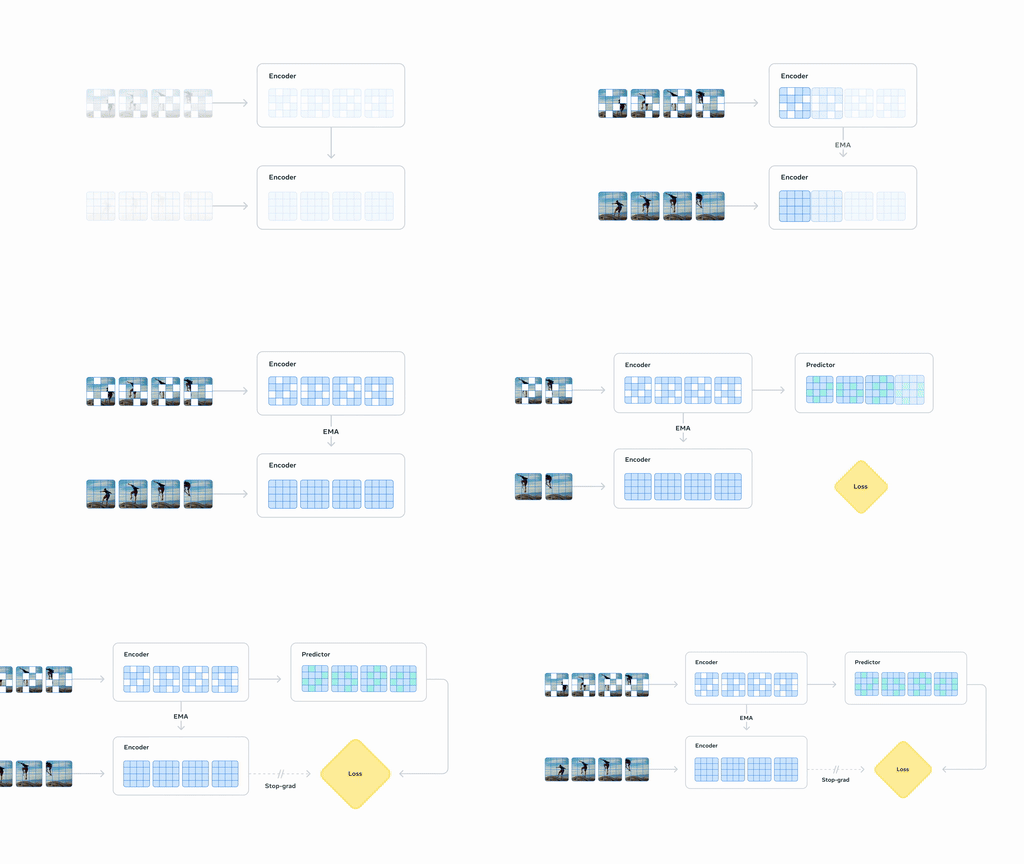
모든 원본 V-JEPA2 체크포인트는 V-JEPA 2 컬렉션에서 찾을 수 있습니다.
이 모델은 koustuvs, yonigozlan, qubvel에 의해 기여되었습니다. 원본 코드는 여기에서 찾을 수 있습니다.
사용 예시
아래 스니펫은 AutoModel 클래스를 사용하여 V-JEPA 2 모델을 특징 추출용으로 로드하는 방법을 보여줍니다.
import numpy as np
from torchcodec.decoders import VideoDecoder


processor = AutoVideoProcessor.from_pretrained("facebook/vjepa2-vitl-fpc64-256")
model = AutoModel.from_pretrained(
    "facebook/vjepa2-vitl-fpc64-256",
    device_map="auto",
    attn_implementation="sdpa"
)

video_url = "https://huggingface.co/datasets/nateraw/kinetics-mini/resolve/main/val/archery/-Qz25rXdMjE_000014_000024.mp4"

vr = VideoDecoder(video_url)
frame_idx = np.arange(0, 64) # choosing some frames. here, you can define more complex sampling strategy
video = vr.get_frames_at(indices=frame_idx).data  # T x C x H x W
video = processor(video, return_tensors="pt").to(model.device)
outputs = model(**video)

# V-JEPA 2 encoder outputs, same as calling `model.get_vision_features()`
encoder_outputs = outputs.last_hidden_state

# V-JEPA 2 predictor outputs
predictor_outputs = outputs.predictor_output.last_hidden_state
V-JEPA 2는 비디오 분류를 위해 finetune할 수도 있습니다. 다음 스니펫에서는 Something-Something-V2 비디오 분류 모델로 finetune된 모델을 사용하는 방법을 보여줍니다.
import numpy as np
import torch
from torchcodec.decoders import VideoDecoder

from transformers import AutoModelForVideoClassification, AutoVideoProcessor


# Load model and video preprocessor
hf_repo = "facebook/vjepa2-vitl-fpc16-256-ssv2"

model = AutoModelForVideoClassification.from_pretrained(hf_repo, device_map="auto")
processor = AutoVideoProcessor.from_pretrained(hf_repo)

# To load a video, sample the number of frames according to the model.
video_url = "https://huggingface.co/datasets/nateraw/kinetics-mini/resolve/main/val/bowling/-WH-lxmGJVY_000005_000015.mp4"
vr = VideoDecoder(video_url)
frame_idx = np.arange(0, model.config.frames_per_clip, 8) # you can define more complex sampling strategy
video = vr.get_frames_at(indices=frame_idx).data  # frames x channels x height x width

# Preprocess and run inference
inputs = processor(video, return_tensors="pt").to(model.device)
with torch.no_grad():
    outputs = model(**inputs)
logits = outputs.logits

print("Top 5 predicted class names:")
top5_indices = logits.topk(5).indices[0]
top5_probs = torch.softmax(logits, dim=-1).topk(5).values[0]
for idx, prob in zip(top5_indices, top5_probs):
    text_label = model.config.id2label[idx.item()]
    print(f" - {text_label}: {prob:.2f}")
VJEPA2Config
클래스 transformers.VJEPA2Config
< source >( transformers_version: str | None = Nonearchitectures: list[str] | None = Noneoutput_hidden_states: bool | None = Falsereturn_dict: bool | None = Truedtype: str | torch.dtype | None = Nonechunk_size_feed_forward: int = 0is_encoder_decoder: bool = Falseid2label: dict[int, str] | dict[str, str] | None = Nonelabel2id: dict[str, int] | dict[str, str] | None = Noneproblem_type: Literal['regression', 'single_label_classification', 'multi_label_classification'] | None = Nonepatch_size: int | list[int] | tuple[int, int] = 16crop_size: int = 256frames_per_clip: int = 64tubelet_size: int = 2hidden_size: int = 1024in_chans: int = 3num_attention_heads: int = 16num_hidden_layers: int = 24drop_path_rate: float | int = 0.0mlp_ratio: int | float = 4.0layer_norm_eps: float = 1e-06qkv_bias: bool = Trueattention_probs_dropout_prob: float | int = 0.0hidden_act: str = 'gelu'initializer_range: float = 0.02attention_dropout: float | int = 0.0num_pooler_layers: int = 3pred_hidden_size: int = 384pred_num_attention_heads: int = 12pred_num_hidden_layers: int = 12pred_num_mask_tokens: int = 10pred_zero_init_mask_tokens: bool = Truepred_mlp_ratio: int | float = 4.0 )
매개변수
- patch_size (
Union[int, list[int], tuple[int, int]], 선택 사항, 기본값16) — 각 패치의 크기(해상도)입니다. - crop_size (
int, 선택 사항, 기본값 256) — 모델의 입력 해상도 - frames_per_clip (
int, 선택, 기본값 64) — 모델이 사전 학습될 때 사용된 프레임 수입니다. 추론에는 영향을 주지 않습니다. - tubelet_size (
int, 선택 사항, 기본값 2) — 단일 rastor에 사용되는 시간 프레임 수입니다. 자세한 내용은 논문을 참고하세요. - hidden_size (
int, 선택 사항, 기본값1024) — 숨겨진 표현의 차원입니다. - in_chans (
int, 선택 사항, 기본값3) — 입력 채널의 수입니다. - num_attention_heads (
int, 선택 사항, 기본값16) — Transformer decoder의 각 attention layer에 사용할 attention head의 수입니다. - num_hidden_layers (
int, 선택 사항, 기본값24) — Transformer decoder의 숨겨진 레이어 수. - drop_path_rate (
Union[float, int], 선택 사항, 기본값0.0) — 패치 융합에 사용할 드롭 패스 비율입니다. - mlp_ratio (
Union[int, float], 선택 사항, 기본값4.0) — MLP 은닉 차원과 임베딩 차원의 비율입니다. - layer_norm_eps (
float, 선택 사항, 기본값1e-06) — 레이어 정규화 레이어에서 사용되는 epsilon 값입니다. - qkv_bias (
bool, 선택 사항, 기본값True) — 쿼리, 키, 값에 bias를 추가할지 여부. - attention_probs_dropout_prob (
Union[float, int], 선택 사항, 기본값0.0) — Attention 확률에 적용할 dropout 비율입니다. - hidden_act (
str, 선택 사항, 기본값gelu) — 디코더에서 사용되는 비선형 활성화 함수(함수 또는 문자열)입니다. 예를 들어,"gelu","relu","silu"등이 있습니다. - initializer_range (
float, 선택 사항, 기본값0.02) — 모든 가중치 행렬을 초기화하는 truncated_normal_initializer의 표준 편차입니다. - attention_dropout (
Union[float, int], 선택 사항, 기본값0.0) — Attention 확률에 적용할 dropout 비율입니다. - num_pooler_layers (
int, 선택 사항, 기본값 3) — pooler의 self-attention 레이어 수입니다. - pred_hidden_size (
int, 선택 사항, 기본값 384) — predictor 레이어의 차원 - pred_num_attention_heads (
int, 선택 사항, 기본값 12) — Predictor의 각 attention layer에 사용할 attention head 수 - pred_num_hidden_layers (
int, 선택 사항, 기본값 12) — Predictor의 숨겨진 레이어 수 - pred_num_mask_tokens (
int, 선택 사항, 기본값 10) — Predictor에서 사용할 mask token의 수를 정의합니다. - pred_zero_init_mask_tokens (
bool, 선택 사항, 기본값True) — predictor의 mask token을 0으로 초기화합니다. - pred_mlp_ratio (
float, 선택, 기본값 4.0) — Predictor에서 사용되는 MLP의 숨겨진 크기(hidden size)가pred_hidden_size에 대한 비율입니다.
이것은 VJEPA2Model의 설정을 저장하기 위한 설정 클래스입니다. 지정된 인자에 따라 Vjepa2 모델을 인스턴스화하여 모델 아키텍처를 정의하는 데 사용됩니다. 기본값으로 설정을 인스턴스화하면 facebook/vjepa2-vitl-fpc64-256의 설정과 유사한 설정이 생성됩니다.
Configuration 객체는 PreTrainedConfig를 상속하며 모델 출력을 제어하는 데 사용할 수 있습니다. 자세한 내용은 PreTrainedConfig의 문서를 참고하세요.
예:
>>> from transformers import VJEPA2Config, VJEPA2Model

>>> # Initializing a VJEPA2 vjepa2-vitl-fpc64-256 style configuration
>>> configuration = VJEPA2Config()

>>> # Initializing a model (with random weights) from the vjepa2-vitl-fpc64-256  style configuration
>>> model = VJEPA2Model(configuration)

>>> # Accessing the model configuration
>>> configuration = model.config
VJEPA2Model
클래스 transformers.VJEPA2Model
< source >( config: VJEPA2Config )
매개변수
- config (VJEPA2Config) — 모델의 모든 매개변수를 포함하는 모델 구성 클래스입니다. 구성 파일로 초기화하는 것은 모델과 관련된 가중치를 로드하지 않으며, 구성만 로드합니다. 모델 가중치를 로드하려면 from_pretrained() 메서드를 확인하세요.
특정 헤드가 위에 없는 상태에서 원시 hidden-states를 출력하는 기본 Vjepa2 Model입니다.
이 모델은 PreTrainedModel에서 상속됩니다. 라이브러리가 모든 모델에 대해 구현하는 일반적 메서드(다운로드 또는 저장, 입력 임베딩 크기 조정, 헤드 프루닝 등)에 대한 세부 사항은 상위 클래스 문서를 확인하세요.
이 모델은 또한 PyTorch torch.nn.Module의 하위 클래스입니다. 일반적인 PyTorch Module처럼 사용하며, 일반적인 사용법 및 동작과 관련된 모든 사항은 PyTorch 문서를 참조하세요.
forward
< source >( pixel_values_videos: Tensorcontext_mask: list[torch.Tensor] | None = Nonetarget_mask: list[torch.Tensor] | None = Noneskip_predictor: bool = False**kwargs: *<class 'transformers.utils.generic.TransformersKwargs'> ) → VJEPA2WithMaskedInputModelOutput or tuple(torch.Tensor)
매개변수
- pixel_values_videos (
torch.Tensor, shape(batch_size, num_frames, num_channels, frame_size, frame_size)) — 입력 비디오에 해당하는 텐서입니다. 비디오의 픽셀 값은 VJEPA2VideoProcessor를 사용하여 얻을 수 있습니다. 자세한 내용은 VJEPA2VideoProcessor.call()를 참조하세요 (processor_class는 비디오 처리에 VJEPA2VideoProcessor를 사용합니다). - context_mask (
torch.Tensor, shape[batch_size, patch_size, 1], 선택 사항) — predictor에 노출될 인코더 출력 패치를 나타내는 마스크 위치 ID입니다. 기본적으로 이 마스크는 predictor가 전체 컨텍스트를 사용할 수 있음을 나타내는 torch.arange(N).unsqueeze(0).repeat(B,1)로 생성됩니다. - target_mask (
torch.Tensor, shape[batch_size, patch_size, 1], 선택 사항) — predictor가 예측 대상으로 사용할 encoder 출력 patch를 나타내는 mask position id입니다. 기본적으로 이 mask는 torch.arange(N).unsqueeze(0).repeat(B,1)로 생성되며, predictor가 모든 encoder patch를 예측해야 함을 나타냅니다. - skip_predictor (
bool, 선택 사항, 기본값False) — predictor forward를 건너뛰도록 하는 플래그로, 인코더 출력만 필요한 경우에 유용합니다
반환값
VJEPA2WithMaskedInputModelOutput 또는 tuple(torch.Tensor)
VJEPA2WithMaskedInputModelOutput 또는 torch.Tensor의 튜플(return_dict=False가 전달되었거나 config.return_dict=False인 경우)로, 구성(VJEPA2Config)과 입력에 따라 다양한 요소를 포함합니다.
VJEPA2Model의 forward 메서드는 __call__ 특수 메서드를 오버라이드합니다.
이 함수 내에서 forward pass의 레시피를 정의해야 하지만, 이후에는 이 함수 대신
Module인스턴스를 호출해야 합니다. 전자는 전처리 및 후처리 단계를 실행하는 것을 처리하는 반면, 후자는 이를 조용히 무시하기 때문입니다.
last_hidden_state (
torch.Tensor, shape(batch_size, sequence_length, hidden_size)) — 모델의 마지막 레이어 출력에서 생성된 hidden-state 시퀀스입니다.masked_hidden_state (
torch.Tensor, shape(batch_size, sequence_length, hidden_size), 선택,context_mask가 제공될 때 반환되며 VJEPA2Encoder 출력에 적용됨) — 모델의 masked hidden state입니다.hidden_states (
tuple[torch.Tensor, ...], 선택 사항,output_hidden_states=True가 전달되거나config.output_hidden_states=True인 경우 반환됨) —torch.Tensor의 튜플(모델에 임베딩 레이어가 있는 경우 임베딩의 출력에 대한 것 1개 + 각 레이어의 출력에 대한 것 1개)로, 모양은(batch_size, sequence_length, hidden_size)입니다.각 레이어의 출력에서 모델의 Hidden-states와 선택적 초기 임베딩 출력을 포함합니다.
attentions (
tuple[torch.Tensor, ...], 선택 사항,output_attentions=True가 전달되었거나config.output_attentions=True인 경우 반환됨) — 각 레이어마다 하나씩 포함된torch.Tensor의 튜플로, 모양은(batch_size, num_heads, sequence_length, sequence_length)입니다.self-attention 헤드에서 가중 평균을 계산하는 데 사용되는 attention softmax 이후의 attention 가중치.
predictor_output (
VJEPA2WithMaskedInputPredictorOutput, 선택) — Predictor 모듈의 출력입니다.
VJEPA2ForVideoClassification
클래스 transformers.VJEPA2ForVideoClassification
< source >( config: VJEPA2Config )
매개변수
- config (VJEPA2Config) — 모델의 모든 매개변수를 포함하는 모델 구성 클래스입니다. 구성 파일로 초기화하는 것은 모델과 관련된 가중치를 로드하지 않으며, 구성만 로드합니다. 모델 가중치를 로드하려면 from_pretrained() 메서드를 확인하세요.
V-JEPA 2 모델은 attentive pooler 위에 선형 레이어를 배치한 비디오 분류 헤드를 갖춘 transformer입니다.
이 모델은 PreTrainedModel에서 상속됩니다. 라이브러리가 모든 모델에 대해 구현하는 일반적 메서드(다운로드 또는 저장, 입력 임베딩 크기 조정, 헤드 프루닝 등)에 대한 세부 사항은 상위 클래스 문서를 확인하세요.
이 모델은 또한 PyTorch torch.nn.Module의 하위 클래스입니다. 일반적인 PyTorch Module처럼 사용하며, 일반적인 사용법 및 동작과 관련된 모든 사항은 PyTorch 문서를 참조하세요.
forward
< source >( pixel_values_videos: Tensorlabels: typing.Optional[torch.Tensor] = None**kwargs: *<class 'transformers.utils.generic.TransformersKwargs'> ) → ImageClassifierOutput or tuple(torch.Tensor)
매개변수
- pixel_values_videos (
torch.Tensor, shape(batch_size, num_frames, num_channels, frame_size, frame_size)) — 입력 비디오에 해당하는 텐서입니다. 비디오의 픽셀 값은 VJEPA2VideoProcessor를 사용하여 얻을 수 있습니다. 자세한 내용은 VJEPA2VideoProcessor.call()를 참조하세요 (processor_class는 비디오 처리에 VJEPA2VideoProcessor를 사용합니다). - labels (
torch.LongTensor, shape(batch_size,), 선택 사항) — 이미지 분류/회귀 손실을 계산하는 데 사용되는 라벨입니다. 인덱스는[0, ..., config.num_labels - 1]범위에 있어야 합니다.config.num_labels == 1인 경우 회귀 손실(평균 제곱 오차)이 계산되고,config.num_labels > 1인 경우 분류 손실(교차 엔트로피)이 계산됩니다.
반환값
ImageClassifierOutput 또는 tuple(torch.Tensor)
torch.Tensor의 튜플 또는 ImageClassifierOutput입니다. return_dict=False가 전달되었거나 config.return_dict=False인 경우, 구성(VJEPA2Config)과 입력에 따라 다양한 요소를 포함합니다.
VJEPA2ForVideoClassification의 forward 메서드는 __call__ 특수 메서드를 오버라이드합니다.
이 함수 내에서 forward pass의 레시피를 정의해야 하지만, 이후에는 이 함수 대신
Module인스턴스를 호출해야 합니다. 전자는 전처리 및 후처리 단계를 실행하는 것을 처리하는 반면, 후자는 이를 조용히 무시하기 때문입니다.
loss (
torch.Tensor, shape(1,), 선택 사항,labels이 제공될 때 반환됨) — 분류 (또는 config.num_labels==1인 경우 회귀) 손실.logits (
torch.Tensor, shape(batch_size, config.num_labels)) — SoftMax 적용 전 분류(또는 config.num_labels==1인 경우 회귀) 점수.hidden_states (
tuple(torch.Tensor), 선택 사항,output_hidden_states=True가 전달되었거나config.output_hidden_states=True인 경우 반환됨) —torch.Tensor의 튜플(모델에 임베딩 레이어가 있는 경우 임베딩의 출력에 대한 것 1개 + 각 단계의 출력에 대한 것 1개)로, 모양은(batch_size, sequence_length, hidden_size)입니다. 각 단계의 출력에서 모델의 히든 스테이트(피처 맵이라고도 함).attentions (
tuple(torch.Tensor), 선택 사항,output_attentions=True가 전달되었거나config.output_attentions=True인 경우 반환됨) — 각 레이어마다 하나씩 포함된torch.Tensor의 튜플로, 모양은(batch_size, num_heads, patch_size, sequence_length)입니다.self-attention 헤드에서 가중 평균을 계산하는 데 사용되는 attention softmax 이후의 attention 가중치.
예:
>>> import torch
>>> import numpy as np
>>> from transformers import AutoVideoProcessor, VJEPA2ForVideoClassification

>>> device = "cuda"

>>> video_processor = AutoVideoProcessor.from_pretrained("facebook/vjepa2-vitl-fpc16-256-ssv2")
>>> model = VJEPA2ForVideoClassification.from_pretrained("facebook/vjepa2-vitl-fpc16-256-ssv2").to(device)

>>> video = np.ones((64, 256, 256, 3))  # 64 frames, 256x256 RGB
>>> inputs = video_processor(video, return_tensors="pt").to(device)

>>> # For inference
>>> with torch.no_grad():
...     outputs = model(**inputs)
>>> logits = outputs.logits

>>> predicted_label = logits.argmax(-1).item()
>>> print(model.config.id2label[predicted_label])

>>> # For training
>>> labels = torch.ones(1, dtype=torch.long, device=device)
>>> loss = model(**inputs, labels=labels).loss
VJEPA2VideoProcessor
class transformers.VJEPA2VideoProcessor
< source >( **kwargs: *<class 'transformers.processing_utils.VideosKwargs'> )
매개변수
- do_convert_rgb (
bool, kwargs, 선택 사항) — 이미지를 RGB로 변환할지 여부입니다. - do_resize (
bool, kwargs, 선택 사항, 기본값True) — 이미지를 리사이즈할지 여부. - size (
Annotated[int | list[int] | tuple[int, ...] | dict[str, int] | None, None], kwargs, 기본값{'shortest_edge' -- 292}): 모델에 전달되는 최대 입력 차원을 설명합니다. - default_to_square (
bool, kwargs, 선택 사항, 기본값True) — size가 int인 경우 리사이즈 시 정사각형 이미지로 기본 설정할지 여부입니다. - resample (
Annotated[Union[int, PILImageResampling, NoneType], None], kwargs, 기본값2) — 이미지 크기를 조정할 때 사용할 리샘플링 필터입니다.PILImageResamplingenum 중 하나를 사용할 수 있습니다.do_resize가True로 설정된 경우에만 효과가 있습니다. - do_rescale (
bool, kwargs, 선택, 기본값True) — 이미지를 다시 스케일링할지 여부. - rescale_factor (
float, kwargs, 선택 사항, 기본값0.00392156862745098) —do_rescale이True로 설정된 경우 이미지를 재조정(rescale)하는 데 사용할 재조정 계수입니다. - do_normalize (
bool, kwargs, 선택, 기본값True) — 이미지를 정규화할지 여부. - image_mean (
Union[float, list[float], tuple[float, ...]], kwargs, 선택, 기본값[0.485, 0.456, 0.406]) — 정규화에 사용할 이미지 평균입니다.do_normalize가True로 설정된 경우에만 효과가 있습니다. - image_std (
Union[float, list[float], tuple[float, ...]], kwargs, 선택, 기본값[0.229, 0.224, 0.225]) — 정규화에 사용할 이미지 표준 편차입니다.do_normalize가True로 설정된 경우에만 효과가 있습니다. - do_center_crop (
bool, kwargs, 선택, 기본값True) — 이미지를 중앙으로 크롭할지 여부. - do_pad (
bool, kwargs, optional) — 이미지를 패딩할지 여부입니다. 패딩은 배치 내 가장 큰 크기로 수행하거나, 이미지마다 고정된 정사각형 크기로 수행합니다. 정확한 패딩 전략은 모델에 따라 달라집니다. - crop_size (
Annotated[int | list[int] | tuple[int, ...] | dict[str, int] | None, None], kwargs, 기본값256) —center_crop을 적용한 후의 출력 이미지 크기입니다. - data_format (
Union[str, ~image_utils.ChannelDimension], kwargs, 선택 사항) —ChannelDimension.FIRST만 지원됩니다. 느린 프로세서와의 호환성을 위해 추가되었습니다. - input_data_format (
Union[str, ~image_utils.ChannelDimension], kwargs, 선택 사항) — 입력 이미지의 채널 차원 형식입니다. 설정되지 않으면 입력 이미지에서 채널 차원 형식을 추론합니다. 다음 중 하나일 수 있습니다:"channels_first"또는ChannelDimension.FIRST: (num_channels, height, width) 형식의 이미지."channels_last"또는ChannelDimension.LAST: (height, width, num_channels) 형식의 이미지."none"또는ChannelDimension.NONE: (height, width) 형식의 이미지.
- device (
Annotated[Union[str, torch.device, NoneType], None], kwargs) — 동영상을 처리할 장치입니다. 설정되지 않은 경우, 입력 동영상에서 장치를 추론합니다. - do_sample_frames (
bool, kwargs, 선택) — 처리 전에 비디오에서 프레임을 샘플링할지, 아니면 비디오 전체를 처리할지 여부를 지정합니다. - video_metadata (
Annotated[~video_utils.VideoMetadata | dict | list[dict | ~video_utils.VideoMetadata] | list[list[dict | ~video_utils.VideoMetadata]] | None, None], kwargs) — 총 길이, fps, 총 프레임 수에 대한 정보를 포함하는 비디오의 메타데이터입니다. 비디오에서 프레임을 샘플링하거나 타임스탬프를 계산하는 데 사용됩니다. 비디오를 수동으로 디코딩하여 처리하려는 경우를 제외하고는 메타데이터를 전달하지 마세요. - fps (
Annotated[int | float | None, None], kwargs) —do_sample_frames=True인 경우 초당 샘플링할 대상 프레임 수. - num_frames (
Annotated[int | None, None], kwargs) —do_sample_frames=True일 때 샘플링할 최대 프레임 수. - return_metadata (
bool, kwargs, 선택, 기본값False) — 비디오 메타데이터를 반환할지 여부입니다. 비디오 메타데이터는 비디오 길이, fps, 디코딩 백엔드 등에 대한 정보를 포함하는 객체입니다. - return_tensors (
Annotated[str | ~utils.generic.TensorType | None, None], kwargs) — 설정된 경우, 특정 프레임워크의 텐서를 반환합니다. 허용되는 값은 다음과 같습니다:'pt': PyTorchtorch.Tensor객체를 반환합니다.'np': NumPynp.ndarray객체를 반환합니다.
- **kwargs (VideosKwargs, optional) — 각 모달리티(텍스트, 이미지, 비디오, 오디오)에 대한 추가 처리 옵션입니다. 모델별 매개변수는 위에 나열되어 있으며, 지원되는 인자의 전체 목록은 TypedDict 클래스를 참조하세요.
VJEPA2VideoProcessor 비디오 프로세서를 생성합니다.